Understanding the Modern Email Security Landscape
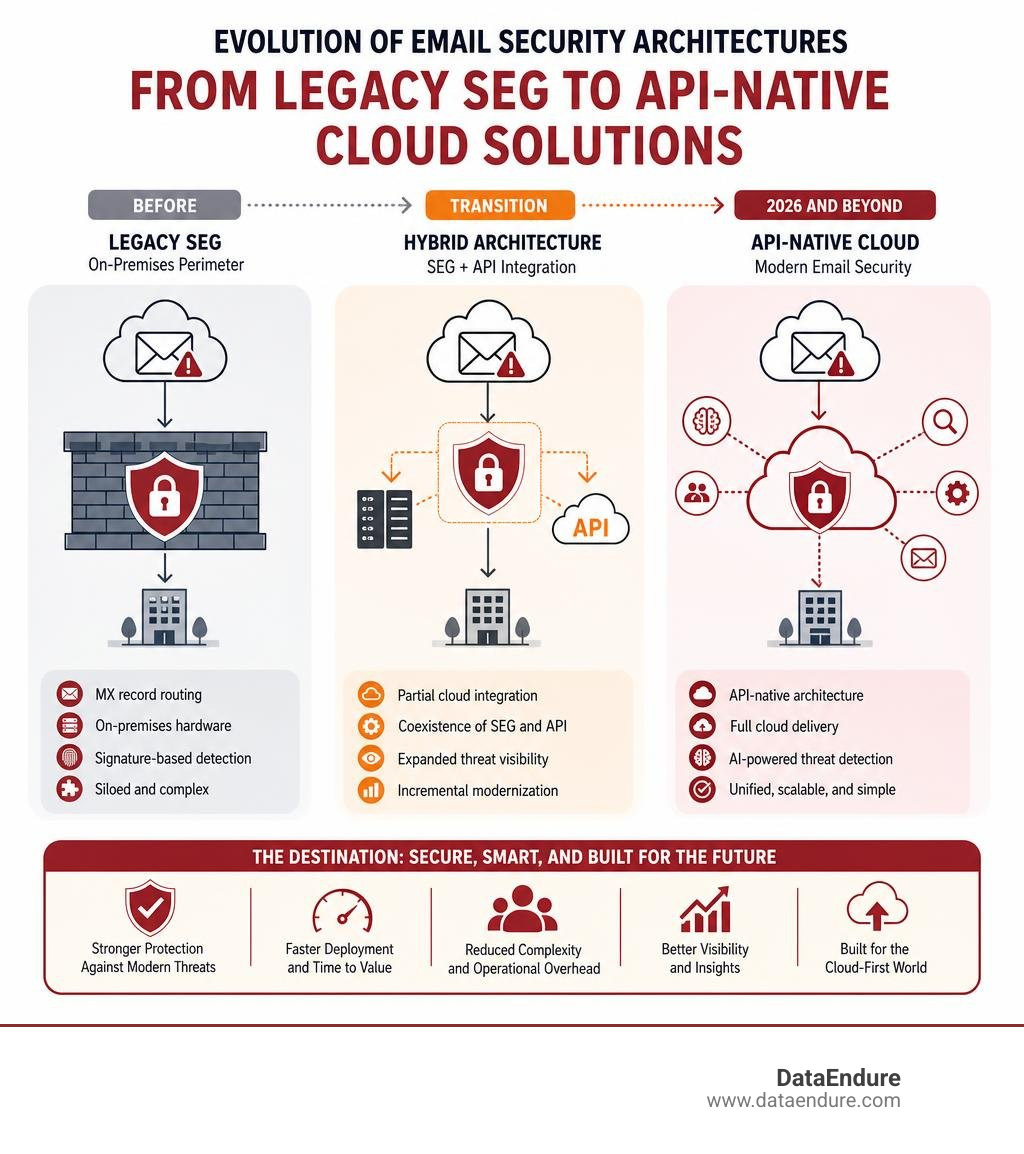
Selecting the right email security architecture is an important decision for protecting enterprise communication channels. Organizations today have access to a variety of deployment models, ranging from traditional secure email gateways (SEGs) to API-native solutions and hybrid implementations.
When evaluating the market, organizations typically categorize solutions based on their integration methods:
- Gateway-Based (SEG): Routes mail flow through external servers to filter threats before delivery. Often preferred for legacy infrastructure and robust outbound compliance.
- API-Native (ICES): Integrates directly with cloud mailboxes (such as Microsoft 365 or Google Workspace) to analyze internal and external mail without changing MX records.
- Hybrid Models: Combine gateway-level pre-filtering with API-level mailbox visibility to provide multi-layered protection.
Rather than relying on a single standard, modern security strategies focus on aligning the chosen deployment model with the organization’s existing infrastructure, administrative capacity, and specific risk profile.
This guide explores how these different architectural approaches function, compares their operational characteristics, and outlines key criteria for evaluating solutions objectively.
Understanding Secure Email Gateways (SEGs) and How They Work
A secure email gateway (SEG) serves as an entry and exit point for an organization’s mail flow, positioned between internal mail servers and external networks. It monitors incoming and outgoing messages to identify and block unauthorized or malicious content before it reaches the recipient.
When an email is sent to an organization’s domain, the gateway intercepts the message to perform several automated verifications. These include analyzing the sender’s domain reputation, verifying authentication protocols (such as SPF, DKIM, and DMARC), and filtering out unsolicited bulk email.
To address more complex security challenges, modern gateway technologies incorporate several advanced capabilities:
- Sandboxing and Behavioral Analysis: Unknown attachments are executed within an isolated virtual environment (a sandbox) to observe their behavior. If the file attempts unauthorized system modifications or connects to suspicious external servers, it is flagged.
- Content Disarm and Reconstruction (CDR): To minimize delivery delays associated with sandboxing, CDR strips active content (such as macros or embedded scripts) from attachments in real-time, delivering a sanitized version to the user.
- Inbound and Outbound Filtering: Inbound filtering prevents external threats from entering the network, while outbound filtering monitors outgoing messages to prevent unauthorized data transmission, supporting Data Loss Prevention (DLP) policies.
Understanding these technical mechanisms is fundamental to recognizing Why is Email Security Important? within a broader defense-in-depth strategy.

Key Architectural Differences: Gateway-Based vs. API-Based Architectures
The email security market offers two primary architectural approaches: gateway-based routing and API-native integration. Understanding the operational differences between these models is essential when evaluating solutions.
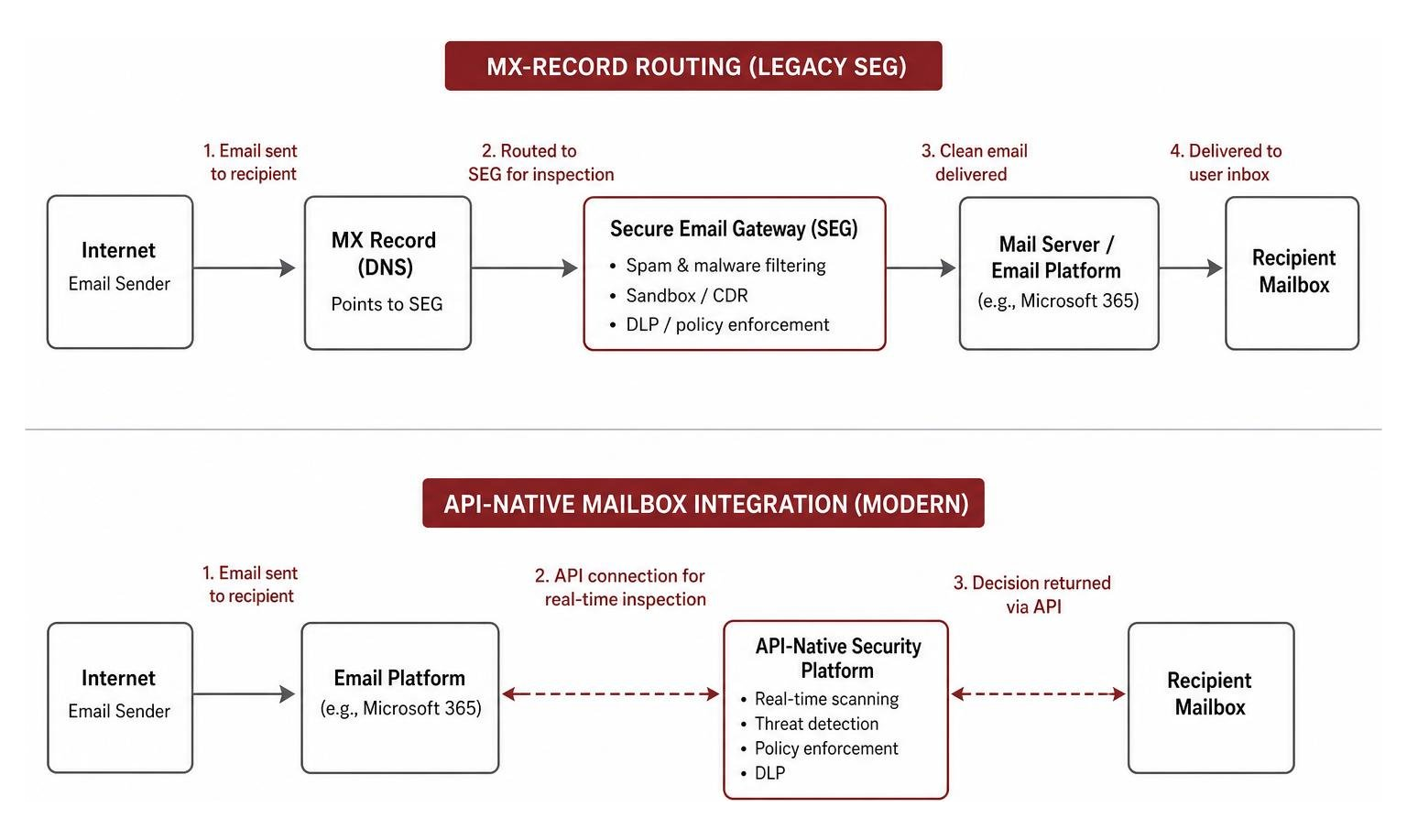
To put these structural differences in perspective, let’s look at how they compare across key operational categories:
| Feature/Capability | Gateway-Based (MX-Record) | API-Native Integration |
|---|---|---|
| Deployment Method | MX Record Redirection | API Integration (e.g., Microsoft Graph API) |
| Setup Time | Requires DNS propagation | Direct integration (no mail flow disruption) |
| Internal Email Scanning | Focuses on perimeter traffic | Analyzes internal-to-internal mailboxes |
| External Visibility | Visible via public DNS lookup | Not exposed via public DNS records |
| Latency | Introduces routing hops | Processes post-delivery or inline via API |
| Collaboration Tool Support | Primarily limited to email | Extends to platforms like Teams, Slack, etc. |
This architectural choice impacts how security policies are enforced and managed, as detailed in our analysis of Why is Email Security Important? (2). Let’s examine how each routing method operates.
Gateway-Based Routing (MX-Record)
Gateway-based solutions require modifying the domain’s Mail Exchanger (MX) records. This configuration directs incoming mail to the security provider’s servers first, where filtering is applied before the messages are forwarded to the primary mail server (such as Microsoft 365, Google Workspace, or on-premises Exchange).
While this pre-delivery filtering reduces the volume of unwanted traffic reaching the primary mail server, it presents specific operational characteristics:
- Public DNS Configuration: Because MX records are public, the security provider in use can be identified through standard DNS queries.
- Perimeter Focus: Traditional gateway routing focuses on traffic crossing the organizational boundary, meaning internal-to-internal communications typically require separate monitoring configurations to detect lateral movement.
- Continuity Features: Many gateway solutions include email spooling capabilities, which temporarily store incoming messages if the primary mail server experiences downtime, supporting business continuity.
API-Native Integration
API-native solutions connect directly to cloud email platforms using native application programming interfaces (such as the Microsoft Graph API), bypassing the need for MX record modifications.
This approach introduces different operational dynamics:
- Direct Mailbox Access: By integrating at the mailbox level, API-native tools can analyze inbound, outbound, and internal-to-internal communications, providing visibility into lateral traffic.
- Simplified Deployment: Integration is typically completed through administrative consent within the cloud console, without requiring changes to external routing configurations.
- Behavioral Analysis: Rather than relying solely on static threat signatures, API-native solutions often utilize natural language processing (NLP) and machine learning to establish communication baselines, helping to identify anomalies in message tone, sender behavior, or request patterns.
How to Evaluate and Compare Email Security Solutions
Selecting an email security solution requires evaluating how different technologies perform in real-world environments, their operational impact, and how they integrate into a broader security architecture.
An effective security posture relies on alignment across different layers. Integrating Email Security with endpoint, network, and identity controls helps minimize operational complexity and reduce visibility gaps.

Key Capabilities to Consider
When comparing solutions, organizations should look beyond basic spam filtering and evaluate capabilities in the following areas:
- Social Engineering and Impersonation Protection: Attacks that rely on text-based deception rather than malicious attachments require behavioral analysis. Solutions should evaluate sender relationships, historical communication patterns, and language sentiment. For more details on addressing these challenges, see our overview of Services: Advanced Phishing Protection.
- Time-of-Click URL Verification: To protect against links that are redirected to malicious destinations after an email has bypassed initial filters, solutions should analyze URLs dynamically at the moment a user clicks them.
- Visual and Brand Analysis: Some solutions incorporate computer vision to detect lookalike logos and fraudulent login portals designed to harvest credentials.
Operational Efficiency and Integration
The effectiveness of a security tool is closely tied to the administrative effort required to manage it. High rates of false positives can lead to alert fatigue and strain security teams.
Consider these operational factors during evaluation:
- Automated Remediation: Evaluate how the platform handles confirmed threats. Automated processes that identify and remove malicious messages across multiple mailboxes can reduce response times and manual workloads.
- SIEM and SOAR Compatibility: Ensure the solution provides robust API support to export security logs to existing security operations center (SOC) tools, enabling centralized threat monitoring.
- Total Cost of Ownership (TCO): When calculating long-term costs, consider licensing fees alongside deployment requirements, ongoing policy tuning, and the administrative hours needed to manage quarantines.
As discussed in our June 2023 Tech Talk: Why Email Security is Falling Behind, maintaining isolated security tools can increase administrative overhead, highlighting the value of integrated security architectures.
Frequently Asked Questions about Email Security
What is the difference between a gateway-based SEG and an API-based email security solution?
A gateway-based secure email gateway (SEG) routes all incoming mail through external servers before delivery, which is effective for high-volume filtering but typically focuses on perimeter traffic. An API-based solution connects directly to cloud email providers via APIs, allowing it to analyze internal communications and deploy without requiring changes to public DNS records.
How do modern email security solutions utilize machine learning?
Modern solutions use behavioral analysis to establish communication baselines for users and external partners. Instead of relying solely on known threat signatures, they analyze contextual signals—such as login locations, writing styles, and interaction history—to identify anomalies associated with impersonation and text-based deception.
Why is outbound email filtering important for compliance?
Outbound filtering helps prevent the unauthorized transmission of sensitive or regulated data, such as personally identifiable information (PII) or protected health information (PHI), by enforcing encryption and data loss prevention policies.
Organizations utilize various specialized tools to meet these requirements. For instance, solutions like the Secure Email Gateway | Email Security Solutions – RMail & RSign can automate outbound encryption based on predefined policy triggers. In complex application environments, platforms like the Email Concentrator | SMTP Concentrator: Secure Email Proxy – Retarus help manage transactional mail flows while maintaining compliance standards. For specialized or highly secure networks, technologies such as the M-Switch Gateway – Isode support secure messaging protocols, while developer-focused tools like the Email API for Transactional Messages and Marketing – GatewayAPI | gatewayapi.com allow organizations to integrate compliant transactional messaging directly into custom applications.
Conclusion
Securing an organization’s primary communication channel requires a clear understanding of existing infrastructure, operational capacity, and the evolving nature of digital communication.
DataEndure provides digital resilience services across security, data, cloud, network, and infrastructure. Rather than focusing on individual tools in isolation, the emphasis is on aligning security architectures to address operational requirements and reduce administrative complexity.
For organizations looking to evaluate or update their email security posture, managed solutions can help streamline deployment and provide ongoing monitoring. To learn more about aligning your security strategy, explore how to Secure your enterprise with DataEndure’s Email Security solutions.