Why a Continuous Security Health Check is Essential for Digital Resilience
A security health check is an automated or structured audit of your IT environment that identifies vulnerabilities, misconfigurations, and compliance gaps before attackers can exploit them.
Here’s what a security health check typically covers:
- Hardware and infrastructure — outdated or unsupported devices that create exposure
- Configuration settings — default passwords, weak policies, and drift from secure baselines
- User accounts and permissions — inactive profiles, excessive privileges, and orphaned access
- Server and network settings — open ports, unencrypted transport, and weak TLS configurations
- Credentials and secrets — hardcoded tokens, shared credentials, and high-entropy patterns
- Compliance alignment — gaps against SOC 2, ISO 27001, PCI-DSS, GDPR, and HIPAA
The result is a scored report — typically 0 to 100 — that tells you exactly where your risks are and what to fix first.
Security doesn’t slip through the cracks on purpose. It slips because teams are stretched thin, alerts pile up, and configuration changes accumulate quietly over time. By the time someone notices, the window of exposure has been open for weeks — sometimes months.
For IT leaders in regulated industries, that gap is unacceptable. A breach isn’t just a technical problem. It triggers compliance investigations, erodes customer trust, and lands directly on the CISO’s desk.
Traditional manual audits can’t keep pace. They’re slow, expensive, and only capture a point-in-time snapshot. By the time the report lands, the environment has already changed. And with staff shortages making deep manual reviews harder to sustain, organizations need a faster, more reliable way to know where they stand.
That’s exactly what a security health check is designed to solve — giving you a clear, measurable picture of your security posture without waiting months for a consultant’s report.
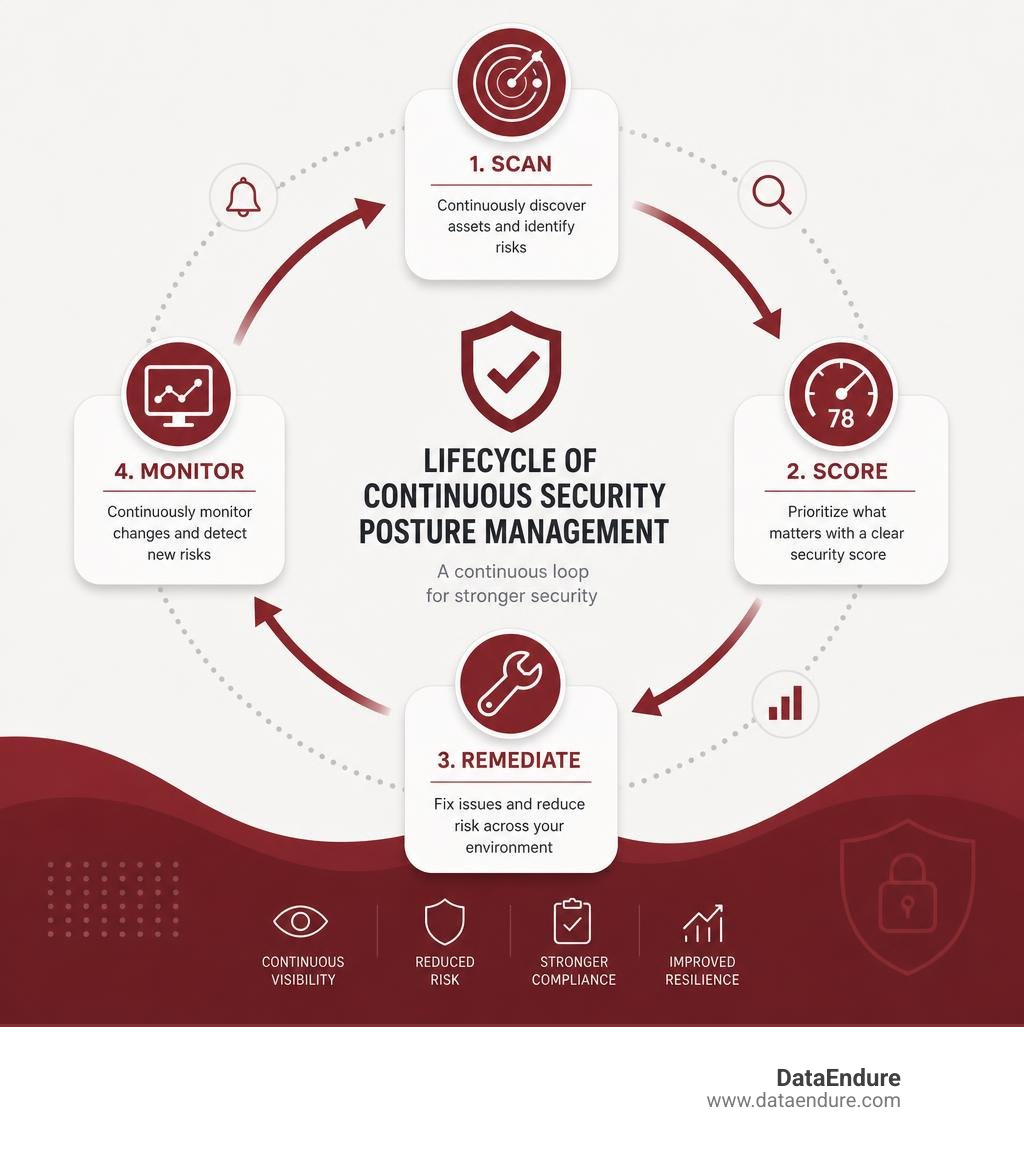
As we navigate the complex landscape of July 2026, organizations face unprecedented pressure to maintain digital resilience. With the rise of autonomous AI systems, hybrid cloud networks, and highly distributed workforces, managing your attack surface requires a proactive, continuous approach. A single misconfiguration can open the floodgates to an expensive breach, making a regular and automated security health check a non-negotiable part of your protective strategy.
At DataEndure, we have spent over 40 years helping organizations build digital resilience. We believe in alignment over complexity. Instead of adding more noisy tools that increase your team’s operational burden, we focus on curated, layered solutions that eliminate blind spots. A key element of this is understanding the health of your existing systems through a structured Vulnerability Assessment and regular posture evaluations.
Key Types of Security Health Check Tools and Their Use Cases
To build an effective digital resilience strategy, you must select the right tool for the right job. Security health checks are not one-size-fits-all; different scanners are optimized for specific layers of your technology stack.
| Tool Category | Primary Focus | Key Use Cases | Example Scanners / Standards |
|---|---|---|---|
| Platform-Specific | CRM, ERP, and identity platforms | Finding orphaned admin accounts, checking session timeouts, verifying password policies | Salesforce Health Check, Gallagher Security Health Check |
| Cloud Infrastructure | Public cloud environments (AWS, GCP, Azure) | Detecting open cloud storage buckets, unencrypted databases, and IAM misconfigurations | Cloud Health Check, Google Cloud Security Health Analytics |
| Website & Public Facing | Public web applications and domain settings | Verifying SSL/TLS certificates, checking DNS security, analyzing HTTP security headers | WebSecurityCheck |
| AI Agent & Developer Tools | Autonomous AI agents and coding assistants | Finding hardcoded secrets, detecting prompt injection vulnerabilities, checking sandbox parameters | Orchesis AI Scanner, cc-health-check (Claude Code) |
Platform-Specific and Cloud Infrastructure Scanners
Platform-specific scanners are built directly into major software ecosystems to ensure that the complex web of user permissions, sharing rules, and system settings remains secure.
For example, physical access control and security system configurations are highly sensitive. Gallagher Security offers a 6x award-winning automated auditing tool designed to run tests across hardware, configurations, users, and server settings. This tool has received significant global recognition, winning a Gold award for Vulnerability Management in the 2020 Cybersecurity Excellence Awards, a Platinum award for Cyber Security at the 2020 Secure Campus Awards, and a Gold award for Cyber Defense Solutions at the 2020 Govies Government Security Awards. It helps physical security administrators identify default passwords and configuration errors that could compromise facility safety.
In the cloud space, infrastructure scanners are essential for maintaining visibility across vast, dynamic environments. Misconfigurations are the leading cause of cloud data breaches. Google Cloud users, for instance, rely on built-in detectors to identify security gaps. By utilizing Using Security Health Analytics | Security Command Center | Google Cloud Documentation, organizations can automatically detect if cloud storage buckets are publicly readable, if multi-factor authentication is missing for administrative users, or if firewalls are overly permissive.
To complement these cloud-specific scans, a broader Network Health Check can help you ensure that your hybrid connectivity, VPNs, and on-premises firewalls are aligned with your cloud security policies, removing potential entry points for lateral movement.
AI Agent and Website Security Scanners
As software development and business operations evolve, two areas have seen rapid growth in vulnerability exposure: public-facing websites and autonomous AI agents.
Public-facing websites are the front door of your organization, making them constant targets for automated reconnaissance. Simple misconfigurations in your web server can leak information to attackers. Using tools like WebSecurityCheck – Website Security Scanner, which has scanned over 10,000 websites and holds a 4.9/5 user rating, organizations can quickly evaluate up to 80% of critical security checks. These checks analyze SSL/TLS certificate validity, DNS security, HTTP security headers, and open ports, providing a verified security score in under 60 seconds.
Simultaneously, the explosive adoption of AI coding assistants and autonomous agents has introduced entirely new security risks. Recent industry data shows that 75% of MCP (Model Context Protocol) configurations contain security problems, leaving organizations vulnerable to data exfiltration and unauthorized code execution.
If your developers are using advanced tools like Claude Code, they must ensure their local environment is secure. The open-source diagnostic tool README.md at master · yurukusa/cc-health-check evaluates Claude Code configurations against 20 known failure patterns—such as un-reviewed pushes to main, file deletion risks, and unencrypted API keys—in just 30 seconds. Running these checks prevents autonomous agents from causing costly operational errors or security breaches.
How to Operationalize Your Security Health Check Results
Running a scan and generating a high-scoring PDF report is only the first step. A security health check is useless if the results sit in an inbox or a shared drive. To build true digital resilience, your organization must know how to translate these automated findings into structured, prioritized remediation workflows.

When a scan finishes, it often presents a long list of vulnerabilities. Attempting to fix all of them at once leads to operational paralysis. Instead, we recommend aligning your security, IT, and compliance teams to tackle findings systematically. If your organization lacks a dedicated security leadership team to orchestrate this process, a structured CISO Assessment can help you establish clear ownership, align security goals with business objectives, and design a sustainable governance framework.
Best Practices for Acting on Health Check Results
To ensure that your remediation efforts are successful and do not disrupt business operations, follow these industry best practices:
- Prioritize by Business Impact, Not Just Severity: While a “High” severity finding should catch your eye, evaluate its context. A medium-risk vulnerability on a core customer database is often more critical to remediate than a high-risk vulnerability on an isolated testing server.
- Test Changes in a Sandbox First: It can be tempting to click the “Fix Risks” button on your dashboard to instantly boost your score. However, changing password policies, restricting user permissions, or updating session settings in a live production environment can break active integrations and lock out critical users. Always apply and validate fixes in a sandbox or staging environment first.
- Implement Incremental Changes: Do not try to fix fifty configuration issues simultaneously. Apply changes one at a time, monitor system behavior, and verify that there are no unintended operational consequences before moving to the next item.
- Document Exceptions and Baselines: In some cases, a recommended security setting may genuinely conflict with a critical business process. If you must keep a setting less restrictive than the baseline standard, document the business justification, accept the risk formally, and establish compensating controls.
- Verify Your Backups: Before making sweeping configuration changes to your infrastructure or servers, ensure your disaster recovery systems are fully operational. A routine Backup Health Check ensures that if a security adjustment goes sideways, you can restore your systems to a known good state in minutes.
Integrating Security Health Checks into CI/CD and Maintenance Routines
To prevent “security debt” from accumulating, health checks should be integrated directly into your daily operations rather than treated as an annual chore.
For development teams, this means embedding security scanners directly into your continuous integration and continuous deployment (CI/CD) pipelines. By using tools like the CLI version of the AI agent configuration scanner or website scanners via GitHub Actions, you can automatically run health checks every time code is merged or a configuration file is modified. If a developer accidentally introduces a high-risk change—such as disabling TLS verification or hardcoding an API token—the CI/CD pipeline can automatically fail the build, preventing the vulnerability from ever reaching production.
For IT operations teams, security health checks should be scheduled as part of standard system maintenance. Just as you run patch management routines, automated health checks should run weekly or monthly to capture configuration drift. When combined with a regular Data Risk Health Check, this continuous approach ensures that sensitive customer data, intellectual property, and system credentials remain constantly guarded against unauthorized access.
Limitations of Automated Scans and the Need for Holistic Security
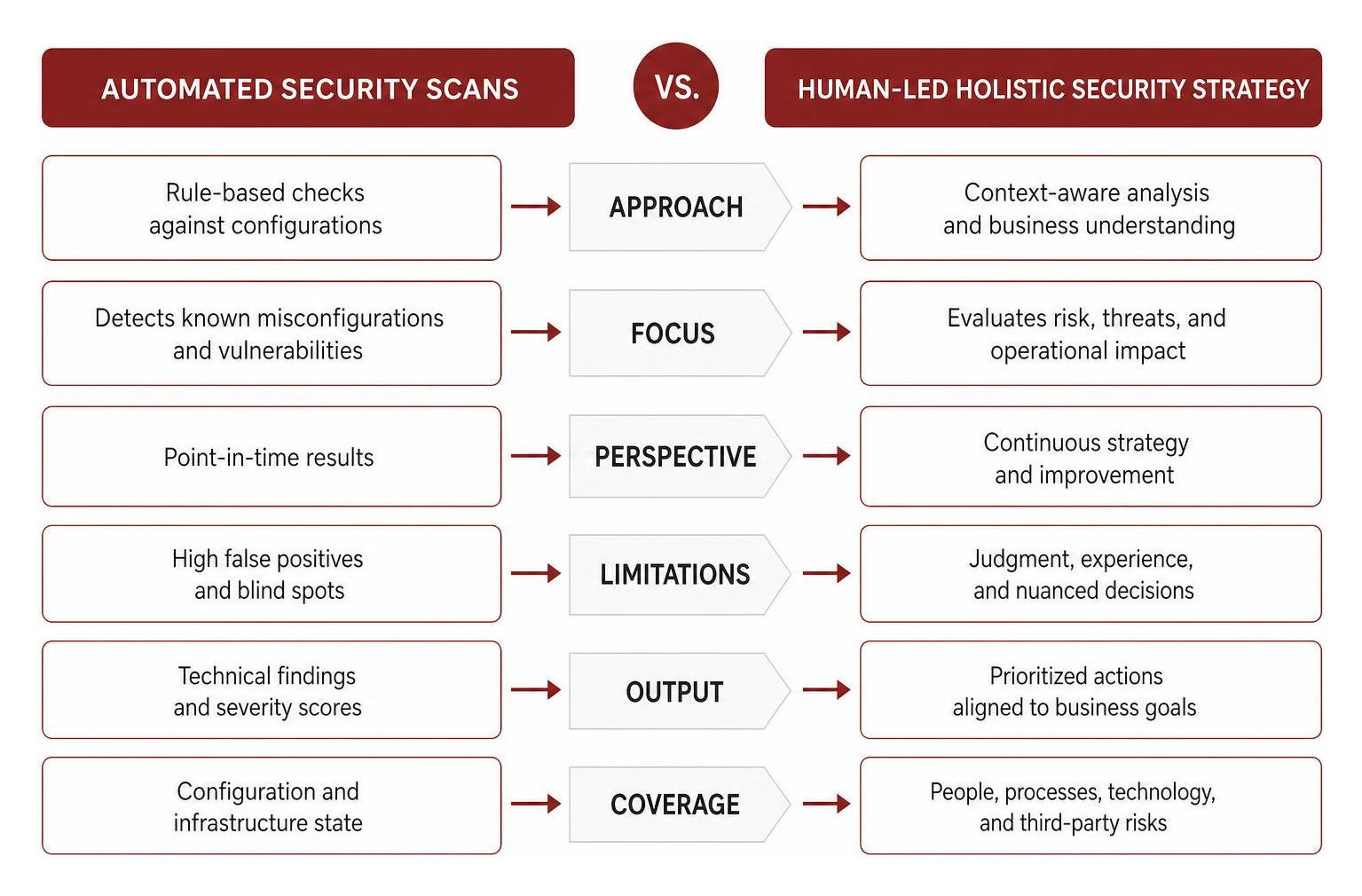
While automated security health checks are incredibly powerful, they are not a silver bullet. Relying solely on automated tools can create a dangerous, false sense of security.
An automated scanner is fundamentally rule-based. It checks if setting “A” matches value “B.” What it cannot do is apply human intellect, understand business context, or analyze complex user behavior. For example:
- The “Perfect Score” Illusion: An organization can achieve a 100/100 score on a platform health check while still being highly vulnerable. The tool may verify that your password policies are strong, but it cannot detect if your employees are falling victim to sophisticated phishing attacks or sharing sensitive credentials over unsecured chat applications.
- Custom Code Vulnerabilities: Automated configuration scanners look at system settings, but they rarely analyze the security flaws within custom-written application code or complex, proprietary API integrations.
- Operational Friction: Some automated recommendations may be technically secure but operationally impossible. A scanner might demand that you disable a legacy integration, but doing so could shut down a core revenue-generating system. Balancing risk with business continuity requires human decision-making.
For these reasons, automated scans must be paired with a comprehensive, human-led security strategy. If you are preparing for cyber insurance renewals, an automated scan alone will not satisfy underwriters. You will need a specialized Cyber Insurance Readiness Health Check to evaluate your broader incident response plans, employee training programs, and overall organizational resilience.
Compliance and Regulatory Alignment
For organizations operating in regulated sectors, a security health check is a vital tool for maintaining continuous compliance. Regulatory frameworks like SOC 2, ISO 27001, PCI-DSS, GDPR, and HIPAA require organizations to prove that they are actively monitoring and protecting sensitive data.
Traditional compliance was an exercise in “check-the-box” audits, where teams scrambled once a year to gather evidence. Today, auditors expect continuous proof of governance. Automated health checks help you maintain an “audit-ready” posture by:
- Generating Continuous Evidence: Automated reports provide a clear, dated history of your configuration settings, proving to auditors that you monitor your environment year-round.
- Mapping to Frameworks: Many modern scanners automatically map configuration findings directly to specific regulatory controls, showing you exactly which settings impact your SOC 2 or HIPAA compliance.
- Accelerating Remediation: By identifying compliance drift immediately, you can correct misconfigurations before they turn into major regulatory violations.
If your organization relies on complex data storage and archiving platforms, ensuring compliance across these environments is critical. A targeted Security Health Check Veritas can help you verify that your data retention policies, backup encryption, and access controls align perfectly with both your internal security standards and external regulatory mandates.
Frequently Asked Questions about Security Health Checks
What is the difference between a security health check and a vulnerability assessment?
While they sound similar, they serve different purposes. A security health check is typically an automated, rapid scan focused on configurations, settings, and alignment with baseline security standards. It answers the question: “Are our systems configured correctly according to best practices?”
A Vulnerability Assessment, on the other hand, is a deeper, more comprehensive analysis. It actively probes systems, applications, and networks to identify known security vulnerabilities, outdated software versions, and exploitable flaws. A vulnerability assessment often involves both automated tools and human analysis to understand how different vulnerabilities could be chained together by an attacker to compromise your network.
How often should an organization run a security health check?
At a minimum, we recommend running automated security health checks monthly, with a deep-dive review conducted quarterly. However, in highly dynamic cloud environments or fast-moving development pipelines, configuration drift can happen in a matter of hours. In these cases, integrating continuous, daily automated scans into your cloud console or CI/CD pipelines is the best way to catch unauthorized changes before they can be exploited.
Can a security health check automatically fix identified vulnerabilities?
Some platforms offer “one-click” remediation features (such as Salesforce’s “Fix Risks” button) that can automatically adjust certain configurations to match baseline standards. However, automated fixes should be used with extreme caution. Automatically changing security settings without testing can break third-party integrations, disrupt user access, and cause system downtime. It is always a best practice to review findings manually, apply fixes in a sandbox environment, and verify system stability before deploying changes to production.
Conclusion
In the modern digital landscape, security is not a destination—it is a continuous state of operational readiness. A single overlooked configuration, an orphaned admin account, or an unpatched server can quickly compromise your entire infrastructure.
While automated security health checks are invaluable for identifying immediate gaps and tracking configuration drift, they are most effective when integrated into a broader, holistic defense strategy. True digital resilience requires an approach that connects your network, cloud, data, and endpoint security into a unified, proactive shield.
At DataEndure, we have spent more than 40 years serving as a multi-disciplinary partner in digital resilience. We help organizations across Silicon Valley and Santa Clara, CA, eliminate tool sprawl, reduce the operational burden on IT teams, and build robust, layered security postures. Our managed cybersecurity solutions are designed to deliver real business outcomes:
- Rapid Breach Detection: We detect and contain active breaches in minutes using highly skilled, local experts.
- Alert Fatigue Reduction: We filter out the noise, ensuring your team only focuses on verified, actionable threats.
- Rapid Deployment: We can fully deploy our managed security solutions and integrate with your existing environment within 30 days.
We believe in alignment over complexity, helping you leverage your existing investments while closing critical security gaps. If you are ready to stop guessing about your security posture and take control of your digital resilience, let us help you find your baseline.
Contact our team today to schedule a Complimentary Security Review or explore how our tailored Security Health Check services can help protect your business, simplify compliance, and give you peace of mind.