What Is Broadcom Endpoint Security — and Should You Still Rely on It?
Broadcom endpoint security is the enterprise security portfolio built on Symantec’s technology following Broadcom’s 2019 acquisition of Symantec’s enterprise division. It includes two core products: Symantec Endpoint Protection (SEP), which guards against malware, intrusions, and network threats, and Symantec Endpoint Encryption (SEE), which protects data at rest using FIPS 140-2 validated cryptography. Together, they serve as a layered defense for servers, desktops, and removable media across Windows, macOS, and Linux environments.
Organizations often seek to navigate, manage, and optimize these enterprise tools to ensure they deliver consistent protection while managing administrative overhead.
Quick answer for IT leaders evaluating this platform:
- What it protects: Endpoints (servers, desktops, laptops) and removable media (USB drives, external hard drives, optical media)
- Core technologies: Anti-malware, intrusion prevention, firewall, machine learning, full-disk encryption
- Who manages it: Broadcom Inc., following its acquisition of Symantec’s enterprise security business in 2019
- Latest stable release: Version 14.4 (Build 115), released March 2, 2026
- Key compliance support: FIPS 140-2, HIPAA, PCI DSS, GDPR (including Safe Harbor provisions)
- Common criticisms: Customer fatigue from frequent product and company direction changes, steep support fees
If you’re an IT director or CISO in a regulated industry, evaluating whether this platform aligns with your current compliance and security requirements is a key step in strategy planning. This guide covers those considerations.
Symantec Endpoint Protection has been one of the most widely deployed enterprise security suites in the world. As of 2016, Symantec reported drawing threat intelligence from over 175 million devices across 175 countries. That kind of global telemetry is genuinely powerful. But the Broadcom acquisition introduced questions about product direction, licensing, and long-term support that are important for IT leaders to evaluate.
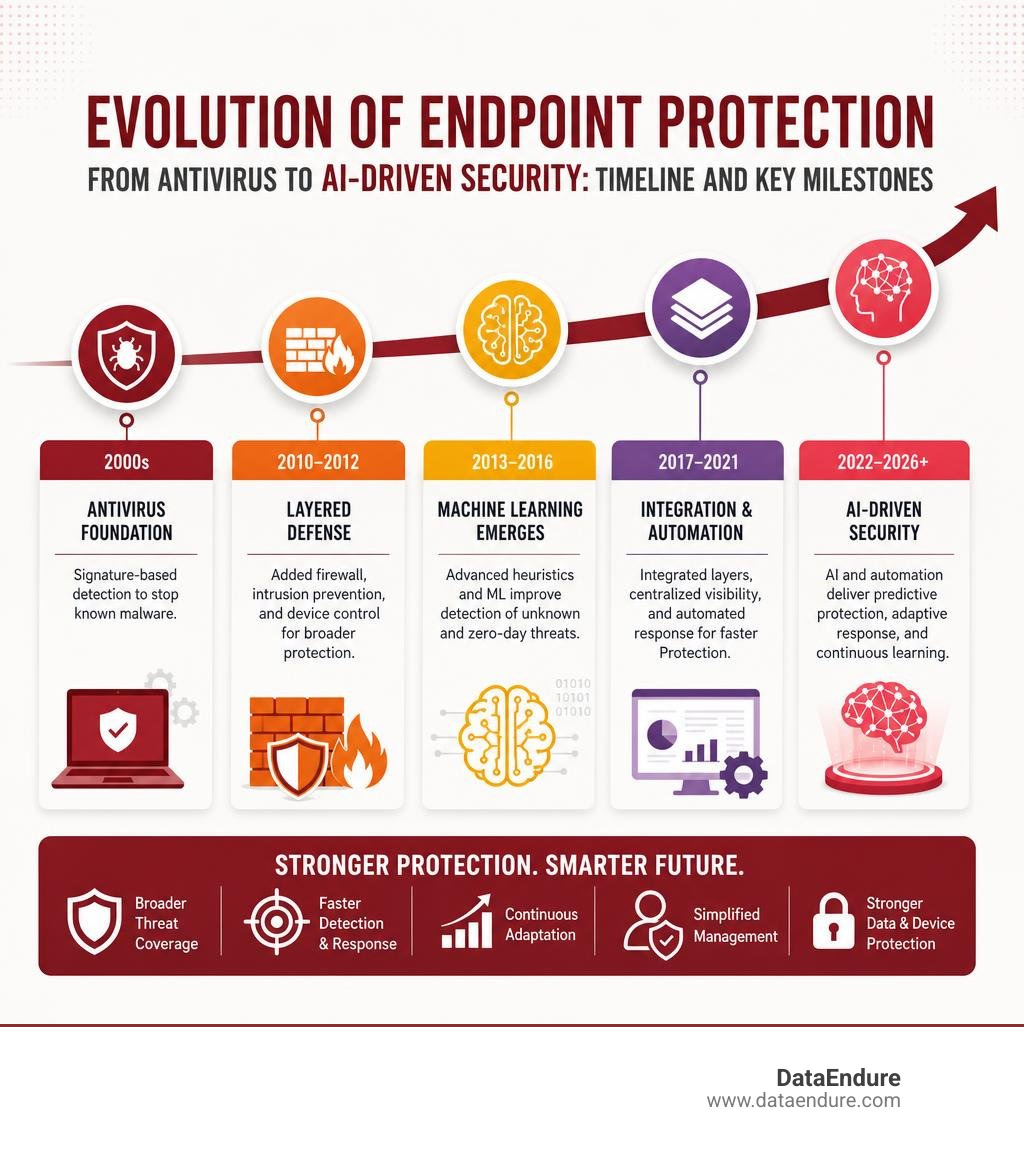
The platform has evolved significantly since its first release in September 2007 — from a bloated, signature-based antivirus tool to a multi-layered, machine-learning-driven security suite. But evolution brings complexity. And for mid-sized teams, managing this complexity can require careful resource allocation.
Gartner has noted that customers are experiencing fatigue from “near constant changes” in both the product and company direction. That’s a signal worth paying attention to before you commit to a renewal or a new deployment.
This guide breaks down everything you need to make a clear-eyed decision: the features, the gaps, the acquisition impact, independent analyst ratings, and how the platform fits into a modern, resilient security architecture.
The Core Pillars of Broadcom Endpoint Security: SEP vs. SEE
To properly evaluate this ecosystem, it is critical to understand that broadcom endpoint security relies on two distinct but complementary workhorses: Symantec Endpoint Protection (SEP) and Symantec Endpoint Encryption (SEE). While they are often bundled or managed under the same corporate umbrella, they perform entirely different roles in your security stack.
- Symantec Endpoint Protection (SEP) is your active threat defender. It is designed to stop active exploits, malware, and network-based attacks. It sits on the endpoint, constantly scanning files, monitoring behavior, and blocking unauthorized network traffic.
- Symantec Endpoint Encryption (SEE) is your passive data protector. It does not look for malware or block network exploits. Instead, it ensures that if an endpoint (like a laptop or a USB drive) is physically lost or stolen, the data on it remains completely unreadable to unauthorized parties.
When deployed together, they create a highly resilient boundary. For example, if a remote worker plugs in an unapproved USB drive, SEP’s device control policies can govern whether the device is allowed to mount, while SEE handles the background encryption of any files transferred to it.
To help align your endpoint architecture, we’ve broken down the key differences between these two solutions in the table below:
| Feature/Capability | Symantec Endpoint Protection (SEP) | Symantec Endpoint Encryption (SEE) |
|---|---|---|
| Primary Goal | Prevent, detect, and remediate active threats and malware. | Prevent unauthorized access to data on lost or stolen devices. |
| Core Mechanisms | Behavioral analysis, machine learning, intrusion prevention, firewall. | Full-disk encryption, removable media encryption, FIPS 140-2 cryptography. |
| Threat Focus | Zero-day exploits, ransomware, network intrusions, fileless attacks. | Physical theft, lost devices, unauthorized data extraction via hardware. |
| User Impact | Active monitoring; runs in the background with minimal footprint. | Transparent sector-by-sector encryption; requires pre-boot authentication. |
| Compliance Value | Real-time threat reporting and defense audits. | Safe Harbor exemption under breach notification laws (HIPAA, GDPR). |
Integrating robust Endpoint Protection with unified encryption is a standard approach to building a structured digital defense, helping to streamline security management across the enterprise.
Key Capabilities of Symantec Endpoint Protection 14
Symantec Endpoint Protection 14 represents a major technological shift from legacy, signature-only antivirus. Historically, signature-based tools struggled against mutating malware — files that alter their code slightly on every infection to bypass traditional detection. SEP 14 addresses this by layering multiple advanced detection engines:
- Symantec Insight: This is a vast, cloud-based reputation database. By analyzing telemetry from millions of global devices, Insight assigns a reputation score to virtually every executable file on the internet. If a file is brand new and has no established track record, SEP blocks or sandboxes it.
- Advanced Machine Learning: Instead of waiting for a signature update, SEP uses trained machine learning models directly on the endpoint to analyze file structures and identify malicious characteristics before the file ever runs.
- Intrusion Prevention System (IPS) and Firewall: SEP’s network threat protection analyzes incoming and outgoing traffic. It blocks known exploits at the network layer before they can execute on the operating system, protecting legacy applications that may have unpatched vulnerabilities.
- Memory Exploit Mitigation: Many modern attacks use “fileless” techniques, hijacking legitimate system processes or exploiting memory vulnerabilities (like buffer overflows). SEP actively monitors system memory to block these hijacking attempts.
- Device Control: This feature lets administrators treat mobile devices and external storage as peripherals. It allows you to block unauthorized USB drives, preventing data exfiltration and protecting the host computer from connected mobile threats.
While these tools are powerful, understanding What is the difference between antivirus and EDR? is crucial. Antivirus and endpoint protection suites are excellent at blocking known threats, but they often lack the deep visibility and threat-hunting capabilities required to stop advanced, persistent adversaries already inside your network.
Securing Data with Symantec Endpoint Encryption
While SEP keeps the bad guys out, Symantec Endpoint Encryption ensures that your data remains safe even when your physical hardware falls into the wrong hands. During its initial deployment, SEE performs a sector-by-sector, full-disk encryption of the drive. This process uses a FIPS 140-2 validated cryptographic module, which is the benchmark standard required by government agencies and highly regulated industries.
SEE’s protection extends beyond internal hard drives to cover:
- USB flash drives and external hard disks
- Optical media, including CDs, DVDs, and Blu-ray discs
- Native OS encryption tools (acting as a centralized manager for Windows BitLocker and macOS FileVault)
Because the encryption happens at the sector level, it is entirely transparent to the end user once they pass the pre-boot authentication screen. For more details on these features, you can refer to the official Endpoint Encryption Product Brief.
The Impact of the Broadcom Acquisition on Enterprise Security
When Broadcom acquired Symantec’s enterprise security division in 2019, the market experienced immediate waves of change. Broadcom shifted its business model to focus heavily on its largest corporate accounts. For many mid-market and enterprise customers, this transition resulted in several major challenges:
- Licensing Restructuring: Traditional, flexible licensing models were replaced with consolidated packages, forcing some organizations to buy bundles containing products they didn’t need.
- Steep Support Fees: Technical support costs increased significantly, prompting industry publications like SC Magazine to note that while setup is straightforward, support fees are “a bit steep.”
- Customer Fatigue: Gartner highlighted a growing sense of fatigue among IT leaders due to near-constant changes in product packaging, support portals, and company direction.
- Slower Feature Innovation: With resources directed toward integrating the massive Symantec portfolio into Broadcom’s infrastructure, some legacy customers felt that rapid product development and customer-centric feature requests took a backseat.
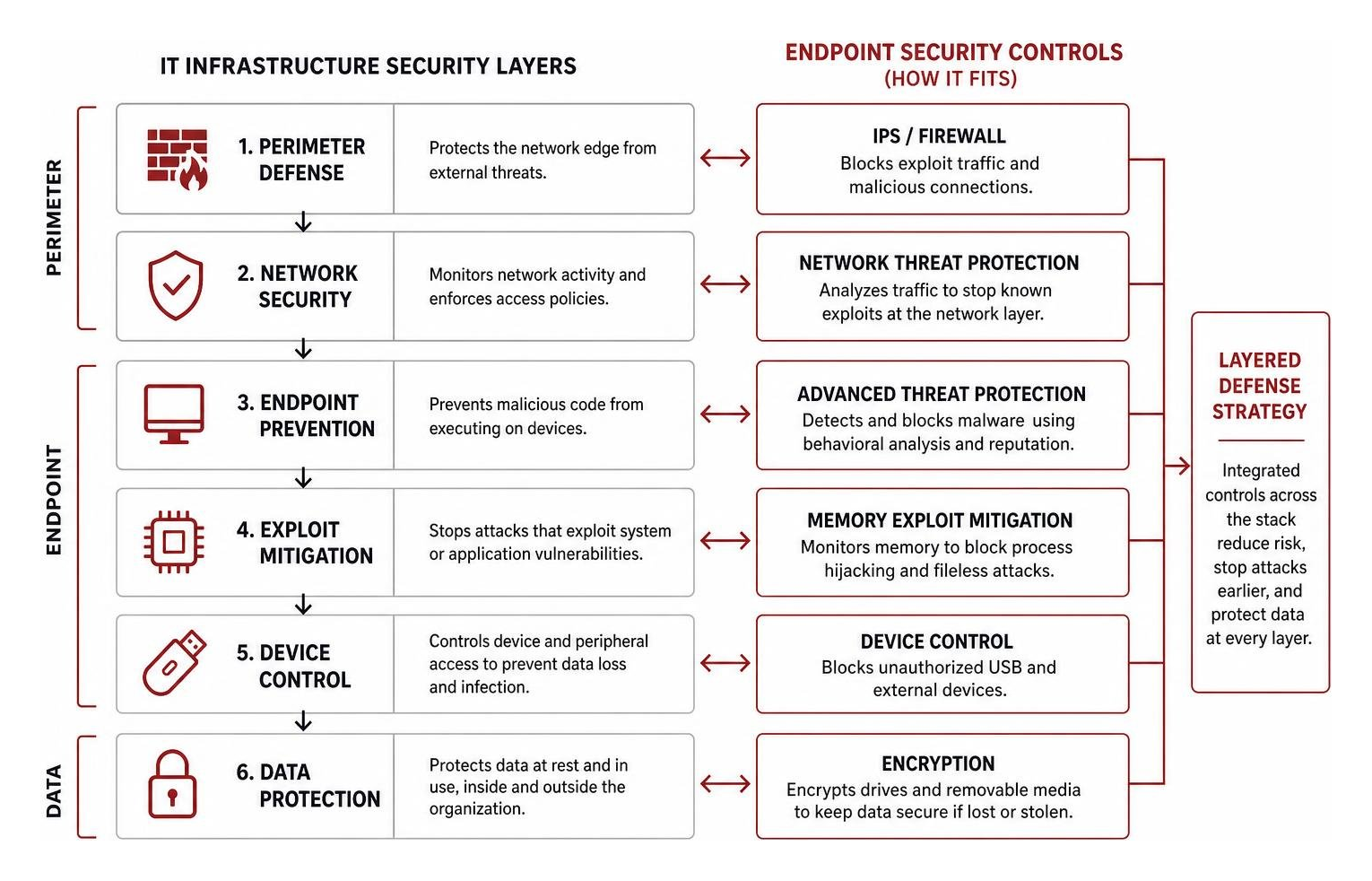
These shifts require IT leaders to carefully evaluate how to maintain robust Endpoint Security while managing operational costs and licensing structures. Ensuring endpoint security integrates into a broader, defense-in-depth strategy is key to maintaining long-term operational efficiency.
Evaluating Broadcom Endpoint Security in Independent Tests
Historically, Symantec Endpoint Protection has been a strong performer in independent evaluations. Analysts like Gartner and Forrester regularly praised the platform’s comprehensive feature set and massive threat intelligence network.
However, industry feedback has also highlighted some notable pain points:
- Forrester Wave: In past evaluations, Forrester criticized older versions (such as 12.1) for having poorly integrated IT security functions, pointing out that managing different agents and consoles created unnecessary friction for administrators.
- Gartner Magic Quadrant: While Gartner continues to recognize the technical strength of the platform, it frequently warns buyers about the operational overhead, support challenges, and “vendor fatigue” associated with Broadcom’s post-acquisition strategy.
- Administrative Friction: Many IT teams note that while the centralized management console is highly detailed, it requires specialized training to master. For lean IT teams, this complexity can lead to misconfigurations or ignored alerts.
When evaluating What tools are used for EDR?, it becomes clear that security is no longer just about having the heaviest agent on the endpoint; it is about how efficiently your team can manage, monitor, and respond to those alerts without burning out.
Technical Specifications and Platform Support for Version 14.4
For organizations maintaining an on-premises or hybrid deployment, keeping up with system requirements is vital. The latest stable release, Symantec Endpoint Protection 14.4 (Build 115), was released on 2 March 2026.
One of the major engineering milestones in the platform’s history was reducing its resource footprint. When Symantec Endpoint Protection was first created by merging legacy tools (including Symantec Antivirus Corporate Edition, Client Security, Network Access Control, and Sygate Enterprise Edition), it had a reputation for being resource-heavy.
To address this “bloatware” criticism, the developers drastically reduced the client’s disk footprint — projecting it down to just 21 MB in version 11.0, compared to Symantec Corporate Edition 10.0’s footprint of almost 100 MB. Modern versions maintain this lightweight philosophy, ensuring that background scans do not kill user productivity.
Version 14.4 supports a wide array of platforms:
- Windows: Windows 10, Windows 11, and Windows Server (2016, 2019, 2022, and 2025).
- macOS: Full support for recent macOS releases, including native compatibility with both Intel and Apple Silicon (M-series) chips.
- Linux: Support for enterprise distributions including Red Hat Enterprise Linux (RHEL), CentOS, Ubuntu, and SUSE Linux Enterprise.
If your team is managing these cross-platform deployments internally, evaluating how Endpoint Detection and Response can be integrated into a broader security model can help streamline operations.
Advanced Integrations: DLP, Compliance, and Remote Work Recovery
For highly regulated organizations, endpoint security cannot exist in a vacuum. It must actively support compliance frameworks like PCI DSS (payment cards), HIPAA (healthcare), and GDPR (privacy).
One of the most powerful aspects of Symantec Endpoint Encryption is its tight integration with Symantec Data Loss Prevention (DLP). Rather than taking a blunt “block everything” approach, this integration allows for smart, policy-driven workflows:
- DLP Scanning: A user attempts to copy a sensitive file (containing credit card numbers or patient records) to an external USB drive.
- Context-Aware Prompting: Instead of simply blocking the transfer and disrupting the user’s workflow, the integrated system prompts the user, explaining that the data is sensitive and must be encrypted.
- On-the-Fly Encryption: The system automatically encrypts the file using SEE’s cryptographic engine before writing it to the removable media, ensuring the data remains secure and compliant while allowing the employee to finish their task.
This level of integration is essential for meeting compliance standards and taking advantage of Safe Harbor provisions. Under many state and international laws, if an organization suffers a physical breach (such as a stolen laptop) but can prove to auditors that the device was fully encrypted using a FIPS-validated module, they are exempt from public breach notification requirements. This helps organizations meet compliance requirements and manage risks associated with physical device loss.
By connecting these tools, you build a unified Threat Detection and Response posture that protects data without creating bottlenecks for your workforce.
Optimizing Broadcom Endpoint Security for Remote and BYOD Workforces
The massive shift to remote work and Bring Your Own Device (BYOD) policies has introduced new security risks. When employees work from home, they often synchronize sensitive corporate files to personal devices or work offline for extended periods.
To support these modern workstyles, Symantec Endpoint Encryption offers several key user-experience and recovery features:
- Single Sign-On (SSO): Users only have to remember one set of credentials. Once they pass the pre-boot authentication screen, SEE passes those credentials directly to the operating system, logging them in seamlessly.
- Connectionless Recovery: If a remote worker gets locked out of their encrypted machine while offline, they don’t need to connect to the corporate network to get back in. SEE supports offline recovery using local, knowledge-based Q&A or web-based help desk tokens.
- Removable Media Utility: If an encrypted USB drive needs to be read on a machine that doesn’t have the SEE client installed (such as a partner’s computer), the system allows authorized users to access the encrypted files securely using a portable reader utility.
As you support these remote environments, you may find yourself asking: Can XDR replace EDR? The answer lies in how well your endpoint controls integrate with identity, network, and cloud security to create a seamless, zero-trust boundary.
Historical Vulnerabilities and Platform Evolution
No security software is entirely immune to exploits, and Broadcom’s endpoint security suite has had its share of historical security incidents. Understanding how these vulnerabilities were handled is key to evaluating the platform’s engineering maturity:
- The 2012 Source Code Leak: A hacker group allegedly stole legacy Symantec source code from Indian military intelligence servers. While the leaked code was older, it forced Symantec to conduct deep security reviews and rebuild trust with enterprise customers.
- The 2012 Windows XP BSOD Bug: A faulty definition update triggered a Blue Screen of Death (BSOD) on Windows XP machines running certain third-party file system drivers. Symantec quickly rolled back the update and released a patch, but the incident highlighted the risks of automated definition updates in complex environments.
- The SEMZTPTN Race Condition: Security researchers discovered a critical race condition vulnerability involving the Client Management and Proactive Threat Protection components. This flaw allowed local attackers to bypass the client’s self-defense mechanisms and escalate privileges. Broadcom resolved this by hardening the client’s core architecture in subsequent patches.
These historical events remind us why relying solely on endpoint software is a risky bet. As discussed in our article, Don’t get caught napping with EDR in cyber security, endpoint tools are a core component of security, but they are typically most effective when paired with continuous monitoring to identify anomalies and potential misconfigurations.
Frequently Asked Questions about Broadcom Endpoint Security
What is the latest stable release of Broadcom’s endpoint security suite?
The latest stable release of the on-premises suite is Symantec Endpoint Protection 14.4 (Build 115), which was officially released on 2 March 2026. This build includes critical security patches, performance optimizations for Windows 11 and macOS, and improved compatibility with modern Linux kernels.
How does Broadcom endpoint security integrate with DLP?
Symantec Endpoint Encryption integrates directly with Symantec Data Loss Prevention (DLP). When a user attempts to copy sensitive data to a removable device, DLP scans the files. If sensitive data is detected, the system prompts the user to encrypt the file using SEE’s FIPS 140-2 validated cryptographic engine, ensuring compliance without completely blocking productivity.
Does Broadcom endpoint security support offline recovery?
Yes. For remote workers who get locked out of their devices without an internet connection, SEE supports connectionless, offline recovery. Users can regain access to their systems using customized, local challenge-response questions or web-based help desk tokens generated by their IT administrators.
Conclusion
Evaluating broadcom endpoint security requires looking beyond technical specifications to consider operational factors. While the core technologies remain highly capable, considerations around licensing structures, support costs, and administrative complexity are important factors when determining the long-term fit for an organization.
A balanced approach to endpoint security focuses on alignment, integration, and reducing operational complexity. Organizations can benefit from evaluating how their endpoint security tools fit into a broader, multi-layered defense strategy, whether by optimizing existing deployments or exploring alternative managed solutions.
For organizations reviewing their security architecture, a practical, outcome-driven evaluation can help identify the most effective path forward. To learn more about optimizing your security posture, you can explore options for Endpoint Protection to find the right balance for your operational needs.