Why Egress Secure Email Matters for Regulated Businesses
Egress secure email refers to the controls organizations use to protect sensitive messages and files as they leave the business. The term is used in its plain-language security sense – secure outbound email, or email egress protection – and does not refer to any single branded product or vendor.
Here is a quick overview of the main architectural options:
| Feature | Policy-Based Secure Email Gateway | Zero-Knowledge Platforms | Dedicated Outbound Infrastructure |
|---|---|---|---|
| Encryption approach | Gateway and/or client-side policy enforcement | Local key, server sees only ciphertext | Owned or tightly controlled network stack |
| Outlook integration | Commonly supported through add-ins or APIs | Commonly supported through local bridges or apps | Commonly supported through API-based workflows |
| Access revocation | Often supported for portal-based messages | Limited once content is decrypted by the recipient | Usually not the primary use case |
| External recipients pay? | Often no, depending on licensing model | Often no, depending on platform | Usually no |
| Jurisdiction | Depends on provider and deployment model | Depends on provider and hosting model | Depends on provider and infrastructure location |
| Independent certification | Varies by vendor and evaluated version | Varies by vendor | Varies by provider controls |
| Best for | Enterprise compliance and DLP-driven workflows | Executive privacy and strict key control | Outbound deliverability and infrastructure assurance |
Standard email was never built to carry sensitive data. There is no native end-to-end encryption, no consistent audit trail, and no reliable way to recall a message once it leaves your environment. For IT leaders in regulated industries – healthcare, finance, legal, and technology – managing outbound data flow is an important compliance and operational consideration.
The challenge is particularly relevant when staff work on mobile devices or collaborate with external partners who use different email platforms. A misdirected email containing sensitive information—such as national identifiers, patient records, or financial statements—can lead to regulatory inquiries and compliance challenges.
Egress secure email controls address this by layering encryption, access control, policy enforcement, and auditability onto the outbound email workflow your team already uses. Because architecture matters, understanding the trade-offs between gateway-based encryption, zero-knowledge privacy tools, and dedicated outbound infrastructure is the starting point for choosing the right layer of protection without adding unnecessary tool sprawl.
Demystifying Egress Secure Email: Architecture and Certifications
To understand how egress secure email works, we must first look at why standard email fails us. Traditional email protocols were designed for interoperability, not confidentiality. Messages can pass through multiple systems before reaching a recipient. Modern mail servers often use Transport Layer Security (TLS) to encrypt server-to-server connections, but TLS only protects the transport path. Once the email lands on the recipient’s server, it may be stored in a form administrators, compromised accounts, or downstream systems can access.
This is where the fundamental question of Why is email security important? becomes critical for modern enterprises. Without dedicated outbound protection, you have limited control over sensitive data once a user clicks “send.”
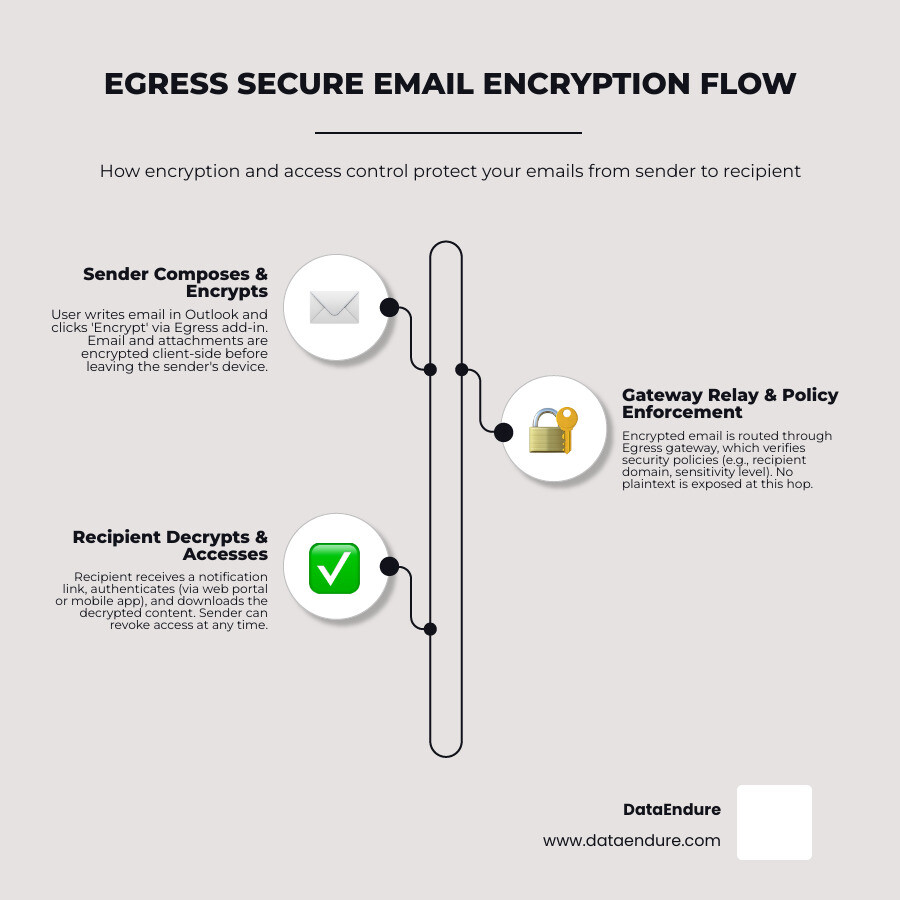
Most secure outbound email architectures include three logical components:
- Client-side controls: Desktop, browser, or mobile tools that let users classify messages, apply encryption, and send protected files from the workflow they already use.
- Gateway or API-based policy enforcement: A boundary or cloud-integrated control point that inspects outbound traffic and applies policy based on data classification, recipient domain, attachment type, or regulated data patterns such as payment card data, PHI, or national identifiers.
- Central management infrastructure: Administrative services that handle authentication, policy databases, message tracking, audit trails, revocation rules, and integration with identity providers.
The implementation details vary by vendor. Some platforms rely on native operating system cryptographic libraries, some use cloud key management services, and others use client-held private keys that the provider cannot access. For CISOs and IT directors, the key question is not whether encryption exists. It is who controls the keys, where policy is enforced, what is logged, and how the system behaves when a message is sent to the wrong person.
How to Send and Open a Secure Outbound Email
For senders, secure outbound email should be as close to the standard email workflow as possible. In a typical Microsoft Outlook or Microsoft 365 environment, a user may select a sensitivity label, choose an encryption option from an add-in, or allow automated DLP rules to apply encryption when sensitive content is detected.
Mobile workflows should also be considered. Some organizations allow users to trigger encryption through classification labels, subject-line tags such as secure, or mobile apps that connect to the same policy engine. Large-file workflows may use secure links or managed file transfer rather than attaching sensitive documents directly to a message.
For recipients, the experience usually depends on whether they are inside or outside the sender’s organization. Internal recipients may be able to open protected content directly if identity, policy, and mail systems are integrated. External recipients are often routed to a secure web portal where they authenticate before reading the message or downloading attachments.
A common external recipient flow looks like this:
- The recipient receives a notification that a protected message is available.
- They click a link to access a secure portal or protected message viewer.
- They authenticate using an account, one-time passcode, federated identity, or another approved method.
- They read the message and download permitted attachments in the browser.
- If allowed, they reply within the protected environment so the response remains encrypted and auditable.
The recipient experience is a major adoption factor. A tool that is technically secure but difficult for clients, patients, partners, or outside counsel to use can push users toward unsafe workarounds.
Security Standards and the Common Criteria EAL2 Certification
For government entities, healthcare systems, and highly regulated enterprises, security claims should be backed by evidence. Independent certifications, penetration tests, SOC reports, and documented cryptographic design all help security leaders assess whether a platform is appropriate for their risk profile.
Common Criteria is one example of an independent security evaluation framework. Evaluation Assurance Level 2 (EAL2) indicates that a product was structurally tested against a defined security target and evaluated configuration. You can review an example of the type of evaluation detail available in a Common Criteria Certification Report.
CISOs should keep a few technical realities in mind when reviewing any certification:
- Evaluated configuration matters: Certifications apply to specific product versions, deployment models, operating systems, and assumptions. A materially different implementation may not inherit the same assurance.
- Patch management remains essential: Security updates, hotfixes, and platform dependencies must be managed carefully so the deployed system remains resilient over time.
- Administrator separation is critical: Dedicated administrative roles, least privilege, MFA, and separation from standard user accounts help preserve the security boundary the control is designed to enforce.
- Certification is not a complete risk assessment: Independent assurance is valuable, but it should be combined with architecture review, data retention analysis, identity integration, incident response planning, and user adoption testing.
Comparing Secure Email Architectures: Gateway vs. Zero-Knowledge vs. Dedicated Infrastructure
When designing a secure communication strategy, security leaders must choose an architecture that aligns with their specific threat model. There is no one-size-fits-all tool. Instead, organizations should evaluate how gateway-based security compares to zero-knowledge encryption and dedicated outbound infrastructure.
To help you weigh these options, review this practical guide on how to Compare email gateway vendors: a practical guide and contrast those controls with other modern architectures.
Gateway-Based Security
Gateway-based systems sit at the edge of your network or integrate directly into cloud mail flow through APIs. They inspect outbound messages and apply encryption dynamically based on corporate policy.
- Key Management: Keys are typically managed centrally by the provider, the enterprise, or an integrated key management system. This can enable useful compliance features such as access revocation, audit logs, DLP enforcement, and administrative reporting.
- The Trade-off: Because policy enforcement and key handling are centralized, the platform may not be zero-knowledge. Security leaders should understand whether the provider, administrator, or hosting environment could theoretically access plaintext under defined conditions.
Zero-Knowledge Architecture
For organizations where absolute executive privacy, professional secrecy, or strict client confidentiality are paramount, zero-knowledge systems offer a fundamentally different approach.
- Key Management: The server only sees encrypted ciphertext. Private keys are generated and controlled locally, and recovery may depend on user-held recovery material, hardware keys, or secret-sharing processes.
- The Trade-off: True zero-knowledge limits centralized administrative search, automated gateway DLP scanning, and cloud-based password resets. If a user loses the only recovery path, the encrypted data may be unrecoverable.
Dedicated Outbound Infrastructure
Other organizations struggle less with individual message secrecy and more with trusted outbound delivery at scale. Dedicated outbound infrastructure focuses on controlling the delivery layer for transactional, operational, and high-volume corporate communications.
- Infrastructure Ownership: Providers may operate dedicated IP ranges, enforce SPF, DKIM, and DMARC alignment, manage sender reputation, and hard-code suppression rules or Do-Not-Contact controls at the delivery gate.
- The Trade-off: This is an operational deliverability and infrastructure model, not a replacement for end-to-end encryption or human-layer data loss prevention. It is best viewed as one layer in a broader email resilience strategy.
Key Considerations for CISOs: Privacy, Compliance, and Usability
For security leaders operating in highly regulated business hubs, choosing egress secure email controls is about balancing regulatory compliance, data protection, workflow efficiency, and user adoption.
If a tool is too complex, employees may bypass it by using personal email, unsanctioned messaging apps, file-sharing links, or other shadow IT. This challenge is discussed in detail regarding how traditional security measures adapt to modern workflows in the June 2023 Tech Talk: Why email security is falling behind.
When evaluating a secure outbound email platform, there are three primary pillars to consider:
1. Jurisdiction and the “Who Can Read My Data?” Problem
If your business handles European data under GDPR, protected health information, financial records, legal communications, or sensitive intellectual property, jurisdiction matters. Provider location, hosting region, support access, lawful access obligations, subcontractors, and data processing terms all affect risk.
Security teams should ask direct questions: Where is data stored? Where are keys stored? Can the provider access plaintext? What happens under subpoena or regulator request? Can the environment support customer-managed keys or bring-your-own-key models? The right answer depends on your risk profile, but the analysis should be explicit.
2. Data Retention and the Scope of Audits
Retention can be a strength or a liability. Audit logs, access records, message metadata, and encrypted packages can help demonstrate compliance and support investigations. However, unnecessary long-term retention increases discovery exposure and may create additional risk if the provider or administrator environment is compromised.
CISOs should align retention settings with legal, regulatory, and business requirements. Retain what is needed to prove control effectiveness, support investigations, and meet compliance obligations – but avoid keeping protected message data longer than necessary.
3. Usability and External Friction
A key factor in the long-term adoption of any secure email solution is the recipient experience. If an external client, partner, patient, or outside counsel must navigate multiple registration steps just to read a one-page document, they may seek alternative, less secure channels to complete their work.
To help mitigate these challenges, organizations can establish a clear set of secure email best practices:
- Classify Before You Send: Train staff to apply high-level encryption to emails containing actual sensitive or regulated data, such as PII, PHI, financial records, contracts, or confidential IP, to avoid encryption fatigue.
- Audit Access Trails Regularly: Review access logs to confirm when external users open protected content, and revoke access immediately if an email was sent to the wrong address.
- Implement SSO and Federation: Integrate secure email workflows with your identity provider, SSO, and conditional access policies to reduce password reset requests and improve enforcement.
- Establish Out-of-Band Verification: Pair MFA or secure link verification with a separate communication channel, such as a phone call or text, for high-risk exchanges rather than relying solely on an inbox that could be compromised.
- Test the Recipient Journey: Validate how external users open, authenticate, reply, and download attachments before rolling out a new workflow across the business.
Overcoming Usability Hurdles in Secure Outbound Email
While secure outbound email platforms can provide strong enterprise protection, real-world deployments often reveal operational friction points that IT departments must be ready to support:
- The Occasional User Barrier: External recipients who only receive encrypted email once or twice a year may find account creation, passcodes, or portal logins cumbersome.
- Network Sensitivity: Users on slow mobile connections may struggle to load protected messages or attachments, especially when traveling or working from restricted networks.
- Password Reset Loops: Portal-based systems can create urgent support issues if recipients forget credentials or cannot complete reset workflows.
- Terminology Confusion: Security-specific terms such as packages, portals, secure objects, or encrypted containers may be less intuitive than familiar email language.
The solution is not simply to choose the tool with the most features. It is to design a workflow that fits the business process, integrates with identity, aligns with compliance obligations, and minimizes the operational burden on both internal teams and external recipients.
Frequently Asked Questions About Egress Secure Email
Is a secure outbound email platform truly secure if it is closed-source?
Closed-source secure email platforms can still be appropriate for regulated enterprises, but they require a different assurance model than open-source or zero-knowledge systems. Organizations should rely on independent certifications, third-party penetration tests, architecture documentation, contractual controls, audit rights, and provider security reporting rather than public source-code review.
The central question is whether the platform aligns with your threat model. A policy-driven gateway may be well suited for compliance, DLP enforcement, access revocation, and auditability. A zero-knowledge architecture may be better for scenarios where the service provider must never be able to access plaintext. Neither model is universally superior; each solves a different business and security problem.
Do external recipients have to pay to reply to secure emails?
Many enterprise secure email platforms allow external recipients to open and reply to protected messages without purchasing a license, though the exact experience depends on the provider and contract. CISOs should confirm this before deployment because recipient friction directly affects adoption.
The best implementations allow external users to authenticate, read, download permitted attachments, and reply within a protected workflow while keeping the interaction simple enough for clients, patients, vendors, and partners to use.
How do secure email platforms handle data privacy and retention?
Data privacy and retention vary by secure email provider, deployment model, and administrative configuration. Most platforms collect some combination of user identity data, message metadata, access logs, diagnostics, and policy events to support authentication, auditing, troubleshooting, and compliance.
Before selecting a solution, security and legal teams should review the provider’s privacy terms, retention settings, regional hosting options, key management model, and deletion processes. The goal is to retain enough evidence to prove control effectiveness and support investigations without creating unnecessary long-term exposure.
Conclusion: Achieving Digital Resilience Without Tool Sprawl
Securing sensitive outbound communications is an integral part of building broader digital resilience. Rather than introducing standalone point solutions that increase administrative overhead and create integration challenges, organizations benefit from a coordinated, layered approach to security.
An effective strategy focuses on alignment over complexity. By evaluating outbound email security as part of a holistic infrastructure—encompassing identity management, data loss prevention, and network controls—businesses can reduce tool sprawl while maintaining appropriate protection.
A vendor-agnostic evaluation of secure outbound email gateways, zero-knowledge workflows, and dedicated delivery infrastructure allows organizations to select the controls that best fit their specific risk profile and operational requirements. This balanced approach helps ensure compliance and data protection without introducing unnecessary friction for users or external recipients.
To learn more about integrating these controls into a broader security strategy, organizations can explore comprehensive Email Security frameworks designed to support resilient, compliant communication.