Configure AWS STS Regional Endpoints for Your Workloads
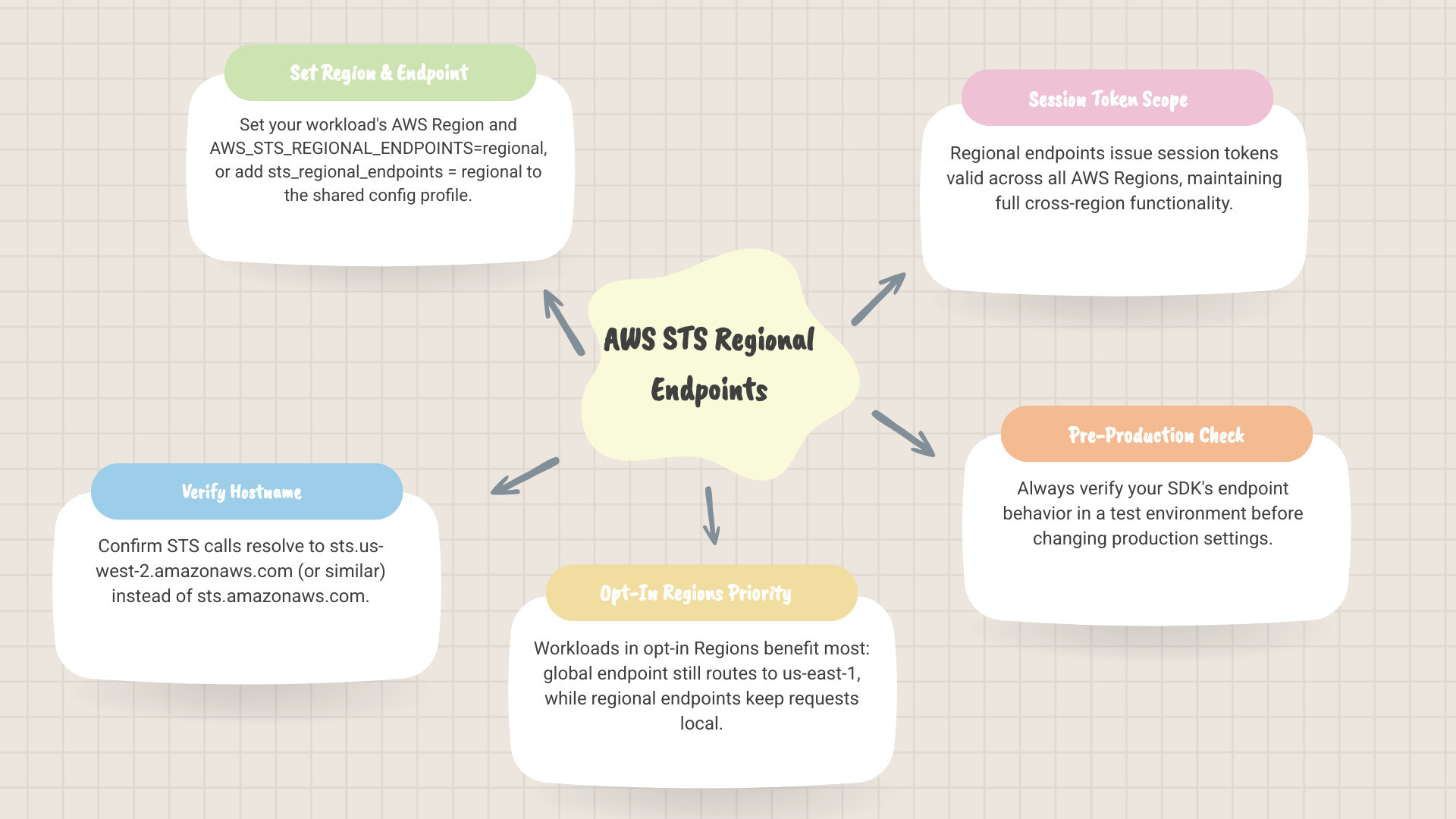
To use aws sts regional endpoints, set your workload’s AWS Region and set AWS_STS_REGIONAL_ENDPOINTS=regional. You can also add sts_regional_endpoints = regional to its shared AWS config profile. Then verify that STS calls reach a hostname such as sts.us-west-2.amazonaws.com, rather than sts.amazonaws.com.
This matters most for workloads in opt-in Regions: calls to the global endpoint still go to US East (N. Virginia). Regional endpoints keep credential requests closer to the workload and issue session tokens valid across all AWS Regions. Check your SDK’s endpoint behavior before changing production settings.
Aws sts regional endpoints terms to know:
Introduction to AWS STS Architecture and Routing Evolution
AWS Security Token Service (AWS STS) provides trusted identity brokering across cloud environments by generating temporary, limited-privilege security credentials for IAM roles, federated identities, and containerized tasks. When AWS STS launched in August 2011, it operated entirely through a single global endpoint (sts.amazonaws.com) hosted in the US East (N. Virginia) us-east-1 Region. In February 2015, AWS introduced regional STS endpoints to remove single-region dependencies, cut down inter-region network latency, and isolate failure domains.

When an application in Asia Pacific, Europe, or Western North America communicates with a single central entry point, every temporary credential exchange traverses cross-region network paths. A transient degradation in the host region or long-haul internet routing can impair credential issuance across entire application fleets. Adopting regional STS endpoints ensures that identity validation and credential generation execute within the geographical boundary of the calling workload.
Global Endpoint Resolution vs. Regional Endpoint Resilience
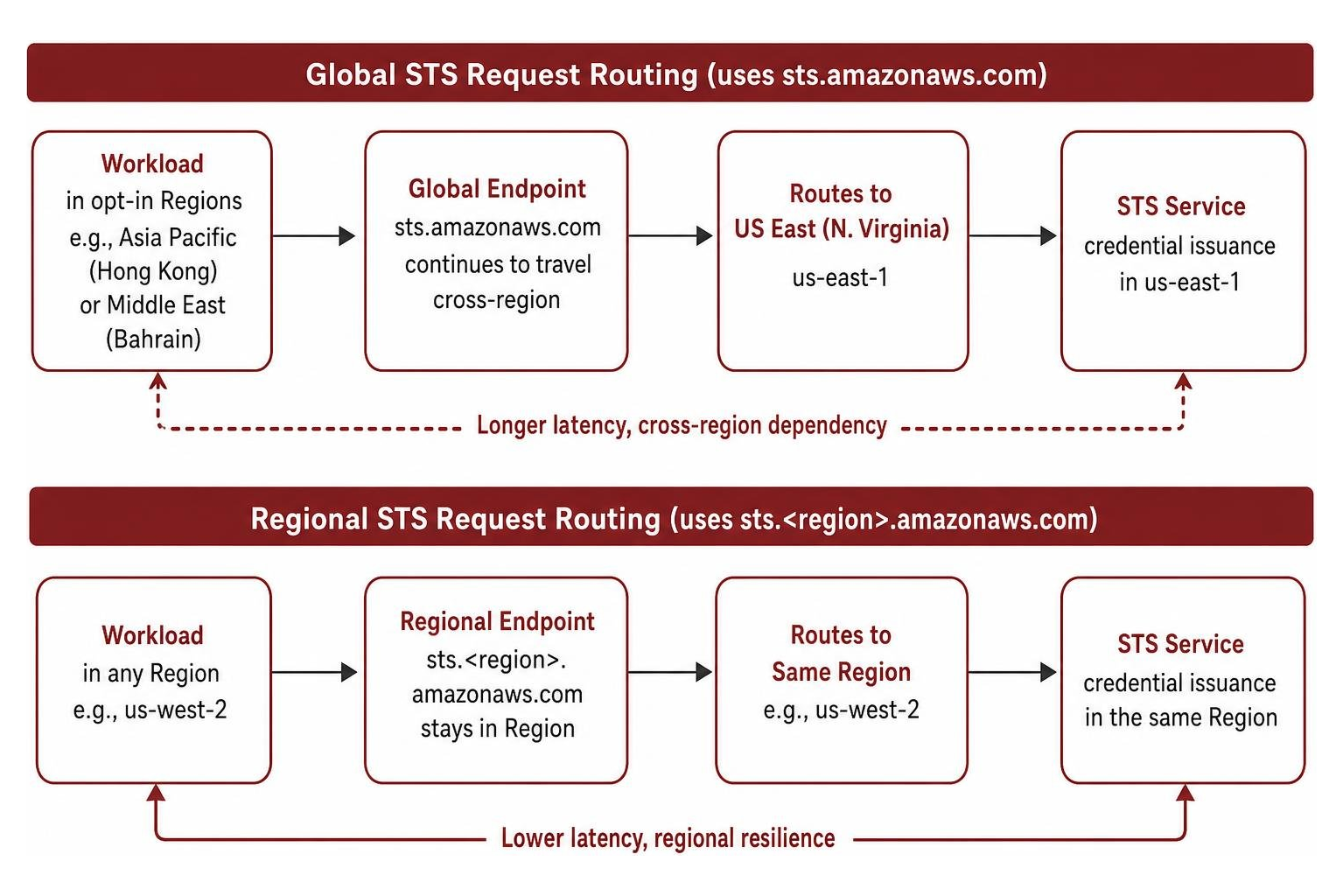
AWS updated the global endpoint behavior in default-enabled Regions to route requests locally when applications resolve hostnames using the Amazon VPC DNS server. Under this architecture, a request sent to sts.amazonaws.com from an EC2 instance or container in us-west-2 is served directly within us-west-2.
However, architectural differences remain between default-enabled and opt-in Regions. In opt-in Regions—such as Asia Pacific (Hong Kong) or Middle East (Bahrain)—requests directed to sts.amazonaws.com continue to travel cross-region to us-east-1. Workloads using non-Amazon DNS resolvers, custom forwarders, or public ISP DNS servers also route global endpoint calls directly to us-east-1, bypassing local VPC handling.
As detailed in the official AWS STS Regions and endpoints documentation, request quotas operate independently. The global endpoint does not share requests-per-second throttling quotas with regional endpoints. Furthermore, IAM condition key evaluations differ: calls to the global endpoint evaluate the aws:RequestedRegion condition key as us-east-1, even when physically processed locally as described in AWS’s announcement on local serving for global endpoints.
| Architectural Characteristic | Legacy Global Endpoint (sts.amazonaws.com) |
Regional Endpoint (sts..amazonaws.com) |
|---|---|---|
| Physical Host Region | us-east-1 (N. Virginia) |
Local AWS Region |
| Default-Enabled Region Routing | Local serving via Amazon VPC DNS; otherwise routes to us-east-1 |
Always processed in the specified local Region |
| Opt-In Region Routing | Always routes cross-region to us-east-1 |
Processed locally within the opt-in Region |
aws:RequestedRegion Evaluation |
Evaluates to us-east-1 |
Evaluates to the target local Region |
| Session Token Scope | Default Version 1 valid only in default Regions | Valid across all AWS Regions |
| Request Rate Limit Quotas | Separate global quota pool | Independent per-Region quota pools |
Why and How to Configure AWS STS Regional Endpoints
Eliminating centralized dependencies is a cornerstone of modern cloud security. Relying on a central endpoint introduces latency penalties that directly impact high-throughput architectures, such as Amazon EKS clusters running IAM Roles for Service Accounts (IRSA). When Kubernetes pods exchange OIDC web identity tokens via AssumeRoleWithWebIdentity, cross-region round trips to us-east-1 can add significant latency to authentication flows compared to the sub-second response times achieved via local regional endpoints.
Regional endpoints also provide essential fault isolation. If network disruption affects an external Region, applications authenticating against local endpoints continue issuing temporary tokens without interruption. In non-commercial AWS partitions such as AWS GovCloud (US) and AWS China, regional endpoints are mandatory. Guidance outlined in the AWS SDKs and Tools Reference Guide for regional endpoints highlights that modern SDKs prioritize regional endpoints to establish deterministic operational boundaries.
Configuring AWS STS Regional Endpoints Across SDKs and Environments
All AWS SDK major versions released after July 2022 default to regional endpoints. AWS completed changing the default endpoint setting from legacy to regional across older SDKs—including Python (Boto3), PHP, C++, .NET, and AWS Tools for PowerShell—on July 31st, 2025, as detailed in the AWS Developer Tools blog on updating AWS SDK defaults and retry strategies.
Organizations can configure the endpoint mode across environments using two primary mechanisms:
- Shared Configuration File: Add
sts_regional_endpoints = regionalunder the target profile within~/.aws/config. - Environment Variable: Export
AWS_STS_REGIONAL_ENDPOINTS=regionalin the system environment, container definition, or Kubernetes pod template.
When regional mode is active, the SDK resolves the client endpoint using the configured Region (for example, AWS_REGION=eu-central-1 generates requests to sts.eu-central-1.amazonaws.com). If an application must target the global endpoint while running under a regional configuration, developers can supply the aws-global pseudo-region parameter.
Developers should account for SDK fallback differences. Modern clients such as AWS SDK for Go v2, Java 2.x, Rust, and Swift throw a runtime initialization error if regional mode is configured without a defined AWS Region. In contrast, older SDKs and AWS CLI v2 fall back to the global or us-east-1 endpoint. Historical bugs, such as an issue in early AWS SDK for .NET 3.x releases where the client bypassed the environment variable in favor of internal defaults, reinforce the importance of maintaining up-to-date SDK dependencies across our identity and access management implementations.
Managing AWS STS Regional Endpoints Activation and Session Token Versions
In default-enabled Regions, AWS STS regional endpoints can be manually activated or deactivated via the IAM console under Account Settings or through the AWS CLI. In opt-in Regions, STS is automatically activated when the Region is enabled for the account and cannot be deactivated independently.
When configuring cross-account role assumption across opt-in Regions, the target account where the IAM role resides must have the Region enabled. The caller account does not need the target Region enabled if it initiates the call through a valid endpoint.
Token length and regional compatibility represent another critical operational consideration. As described in IAM documentation on managing AWS STS in an AWS Region and the general reference on AWS STS endpoints and quotas, STS produces two distinct token formats:
- Version 1 Tokens: Generated by default from the legacy global endpoint. These tokens are shorter in character length and are valid only in default-enabled AWS Regions. They fail authentication when passed to API calls in opt-in Regions.
- Version 2 Tokens: Generated by all regional endpoints and optionally configurable for the global endpoint via
SetSecurityTokenServicePreferences. These tokens are valid in all AWS Regions worldwide.
| Token Attribute | Version 1 Session Tokens | Version 2 Session Tokens |
|---|---|---|
| Issuing Source | Legacy Global Endpoint (default configuration) | Regional Endpoints (default) and Global Endpoint (opted-in) |
| Regional Validity | Default-enabled AWS Regions only | 100% of AWS Regions (default-enabled and opt-in) |
| Token String Length | Shorter character footprint | Longer character footprint |
| Downstream Compatibility | Compatible with legacy, fixed-width database columns | Requires verification of token cache sizes and storage schemas |
| Activation Requirement | Out-of-the-box global endpoint setting | Standard on regional endpoints; enabled via SetSecurityTokenServicePreferences |
Before migrating global endpoint settings to Version 2 tokens via aws iam set-security-token-service-preferences --global-endpoint-token-version v2Token, verify that custom credential caches, web cookies, or backend database schemas can handle longer token strings without truncation.
Securing STS Workloads with VPC Endpoints and CloudTrail Auditing
Securing identity infrastructure requires network containment alongside endpoint tuning. By establishing an Interface VPC Endpoint powered by AWS PrivateLink, temporary credential traffic flows entirely across private AWS networking paths, bypassing the public internet.
This configuration eliminates public gateway exposure for private subnets and ensures compliance with enterprise isolation mandates, drawing on architectural best practices described in AWS Security Blog guidance on global endpoint changes and DataEndure’s cloud expertise.
PrivateLink Integration and Monitoring Regionalized STS Traffic
To implement private token acquisition, create an interface endpoint for the com.amazonaws..sts service within your VPC. In older SDKs, calling the setRegion method alone on default-enabled Regions might still direct requests to sts.amazonaws.com. To ensure traffic routes deterministically through the private interface endpoint, configure both the region and the endpoint URL (for example, using setEndpoint("https://sts..amazonaws.com") or client endpoint overrides) as outlined in the guide on creating a VPC endpoint for AWS STS.
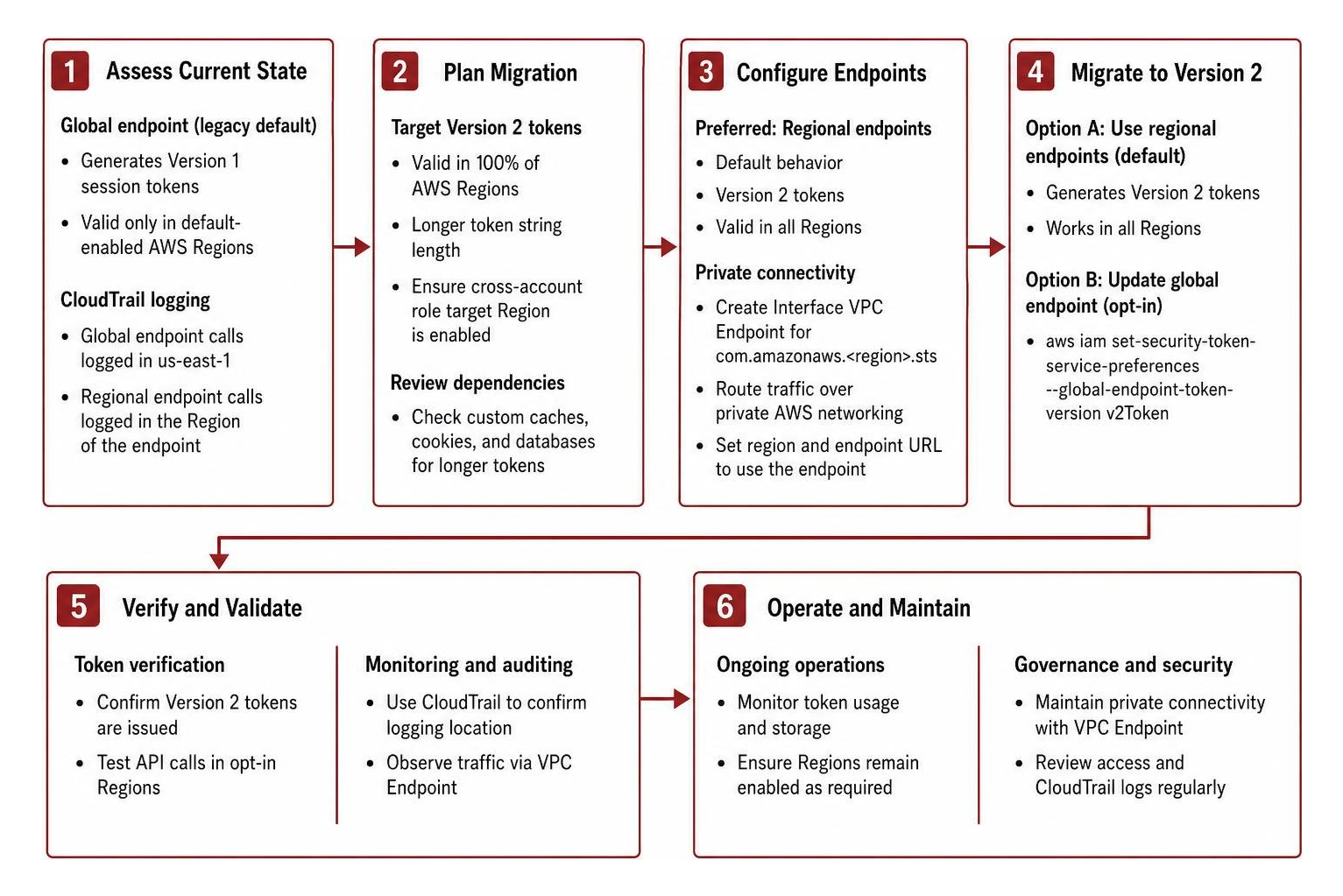
Auditing STS usage through AWS CloudTrail provides operational visibility into how authentication requests travel across your infrastructure. CloudTrail logs STS events differently depending on the targeted endpoint:
- Regional Endpoint Calls: Recorded directly in the AWS CloudTrail event log of the Region where the endpoint is hosted.
- Global Endpoint Calls: Always recorded in the
us-east-1CloudTrail log, even when the request was physically served within another Region by the Amazon VPC DNS resolver.
Security teams can audit global versus regional routing by inspecting specific fields in CloudTrail log entries:
endpointType: Identifies whether the client targetedregionalorglobal.awsServingRegion: Reveals the actual physical Region that processed and fulfilled the STS API request.tlsDetails: Contains cryptographic negotiation metadata, such as TLS version and cipher suites, useful for baseline security verification.
Organizations evaluating their overall cloud posture can use a comprehensive cloud security assessment or review our step-by-step guide to cloud computing security best practices to align network configurations, identity parameters, and logging baselines.
Strengthening Identity and Infrastructure Resilience
Managing AWS STS regional endpoints is a practical architectural step toward eliminating single-point dependencies, lowering authentication latency, and securing multi-region workloads. However, credential issuance is only one part of a resilient operational model. Temporary credentials must be protected throughout their lifecycle, from the infrastructure layers that request them to the workloads and endpoints that consume them.
DataEndure provides comprehensive security capabilities across environments, offering Endpoint Protection, Managed Detection and Response (MDR), Extended Detection and Response (XDR), Open XDR, and Delta Detection & Response (DeltaDR). Delta Detection & Response is a fully managed, unified Security-as-a-Service platform—a white-labeled implementation of the WhiteDog cybersecurity platform—with no comparable solution on the market.
DeltaDR goes beyond traditional XDR by combining a curated, composable security stack with a 24×7 team of security experts delivering continuous incident response, continuous threat exposure management (CTEM), and multi-layered defense spanning email, DNS, identity, endpoint, network, and cloud. Rather than centering operations around a legacy SIEM, DeltaDR provides cross-layer correlation, adaptive protection, an evergreen stack, and rapid onboarding to protect organizations scaling from 5 to 50,000 endpoints.
As you optimize your cloud architectures for regional resilience, how is your team correlating temporary identity authentications with downstream activity across your endpoints and network layers? Contact DataEndure to review your cloud identity posture, validate endpoint configurations, and ensure your operational resilience is supported by unified, round-the-clock defense.