Why Cloud Computing Security Best Practices Matter More Than Ever
Implementing cloud computing security best practices is no longer optional — it is the baseline for any organization that moves workloads, data, or applications to the cloud. Yet for many IT leaders, especially those in regulated industries, getting security right feels like a moving target.
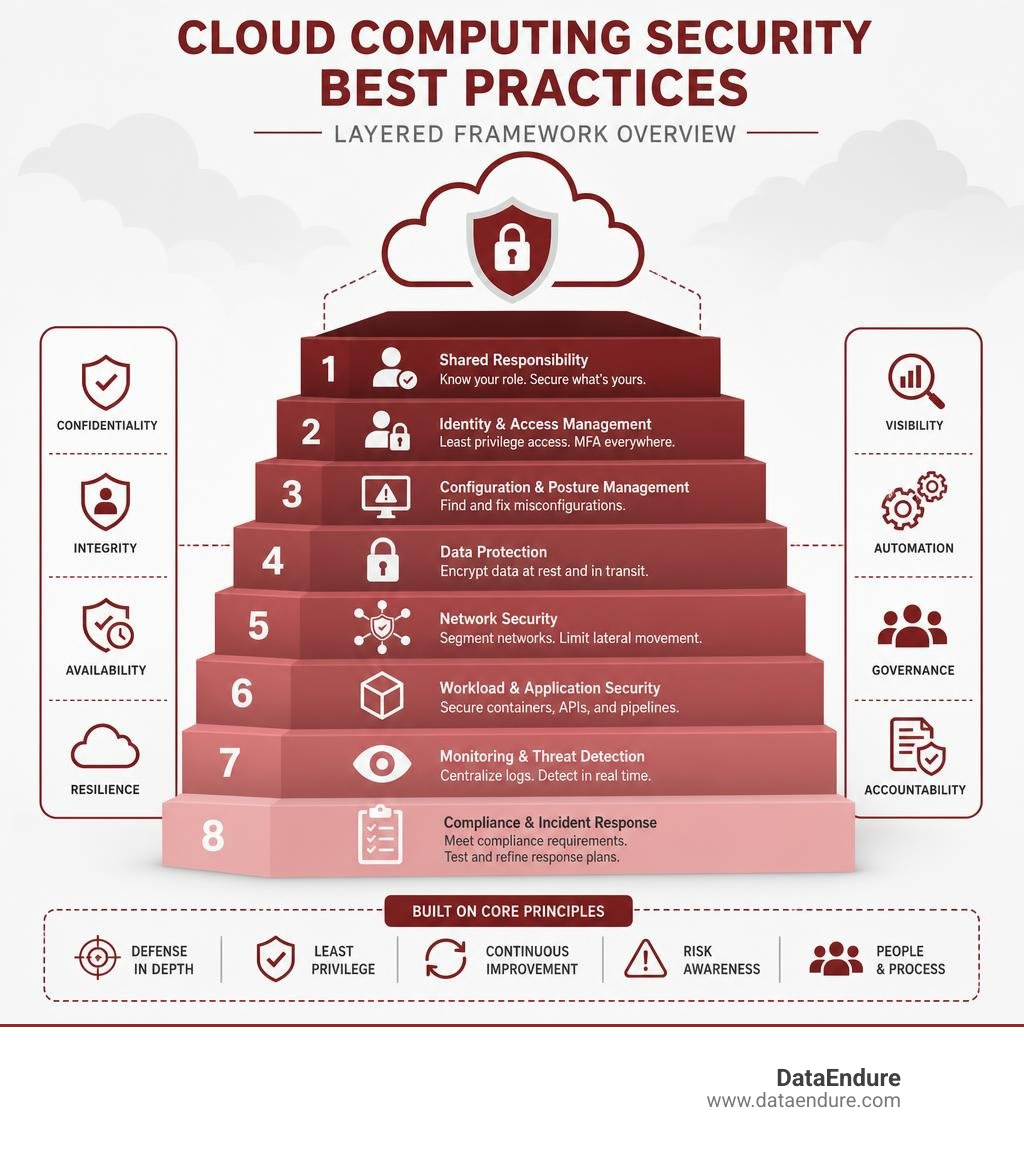
Here is a quick summary of the core cloud security best practices every organization should act on:
- Understand the shared responsibility model — know exactly what your cloud provider secures and what you must secure yourself.
- Enforce identity and access management (IAM) — apply least privilege and multi-factor authentication across all accounts.
- Monitor for misconfigurations — use automated tools (CSPM/CNAPP) to catch and fix errors before attackers exploit them.
- Encrypt data at rest and in transit — use strong encryption standards and rotate keys regularly.
- Segment your network — use micro-segmentation to stop attackers from moving laterally if they gain initial access.
- Secure containers, APIs, and workloads — scan images, protect APIs, and integrate security into your development pipeline.
- Maintain continuous monitoring — centralize logs, detect threats in real time, and reduce alert fatigue.
- Plan for compliance and incident response — align controls with GDPR, HIPAA, or PCI DSS and test your response playbooks regularly.
Cloud adoption is accelerating fast. In 2025, 70% of organizations accelerated their migration to the cloud, up from 63% the year before. That growth brings real business benefits — cost savings, agility, scalability — but it also expands the attack surface significantly.
Most major cloud breaches share a common thread: misconfigurations, overly permissive access, and security teams stretched too thin to catch every gap. The challenge is not just technical. It is operational. Too many tools, too many alerts, not enough context, and not enough staff.
That is where a holistic, layered approach to cloud security becomes critical — one that reduces complexity instead of adding to it.
Cloud computing security best practices further reading:
Demystifying the Shared Responsibility and Shared Fate Models
To secure any cloud environment, you must first answer a deceptively simple question: Who is responsible for what?
Many organizations make the dangerous assumption that because their workloads reside in a world-class public cloud, the cloud provider automatically secures everything. This misunderstanding is one of the leading causes of cloud data exposures.
To clear up this confusion, the industry relies on the Shared Responsibility Model.
At its core, this model divides security into two distinct areas:
- Security OF the Cloud: This is the cloud service provider’s (CSP) job. They protect the global infrastructure, physical security of data centers, hardware, hypervisors, and core networking that run the cloud services.
- Security IN the Cloud: This is your job. You are responsible for securing your data, applications, operating systems, network traffic configurations, identity management, and access controls.
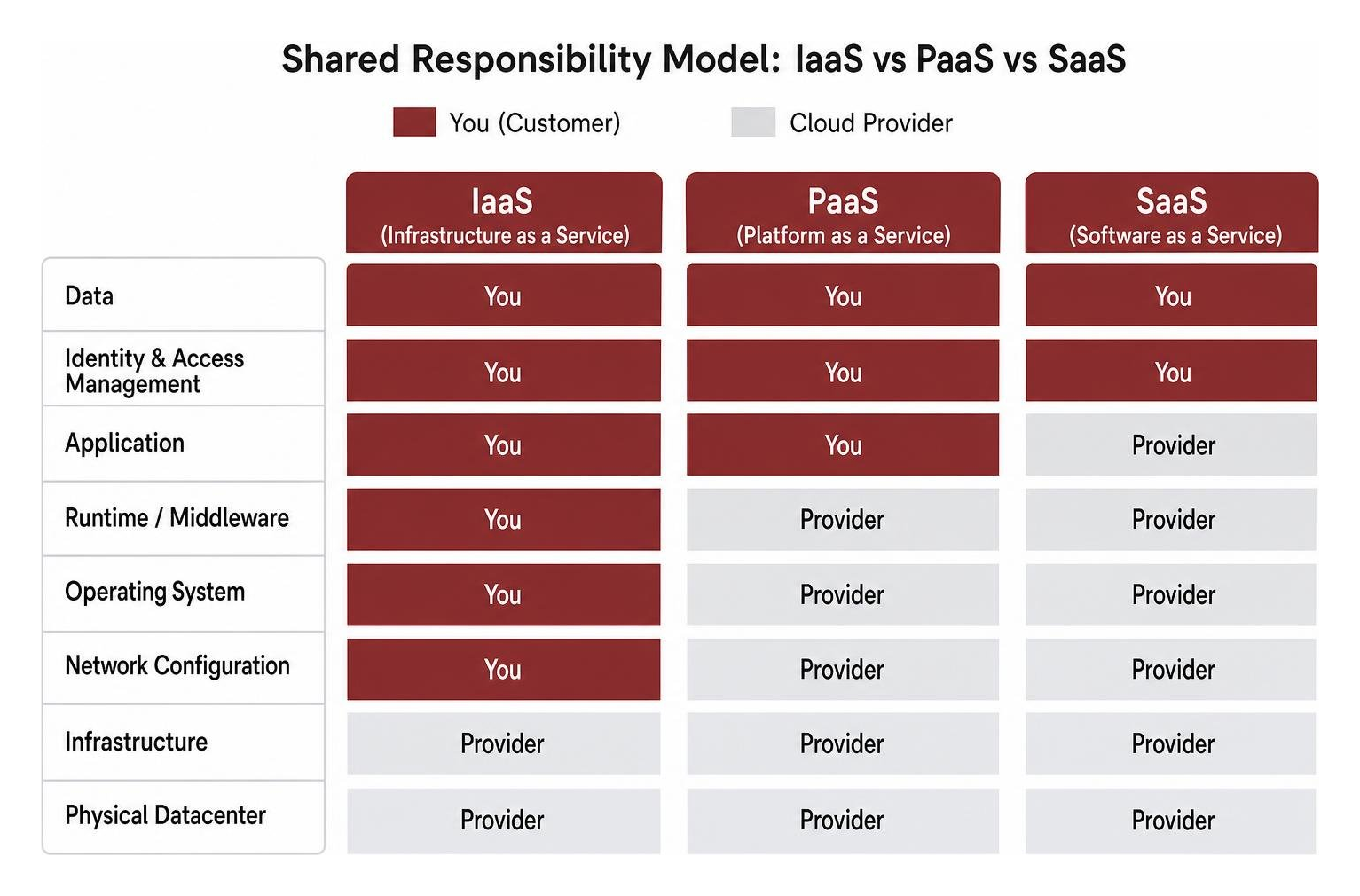
The exact division of labor depends entirely on your deployment model (Infrastructure as a Service, Platform as a Service, or Software as a Service):
- Infrastructure as a Service (IaaS): You have the highest level of control and the greatest amount of responsibility. The provider supplies the physical hardware and virtualization, but you must secure the guest operating systems, middleware, runtime environments, applications, and data.
- Platform as a Service (PaaS): The provider manages the operating system, database engine, and developer tools. Your primary responsibilities shrink to securing your application code, user identities, and data.
- Software as a Service (SaaS): The provider manages the entire application stack. Your primary responsibility is managing access controls, user identities, and the data you input into the system.
For a deeper dive into how this division of labor shifts depending on your architecture, read our guide on Who Shares the Responsibility for Cloud Security?.
From Shared Responsibility to Shared Fate
While the traditional model draws clear boundaries, leading cloud providers have introduced the concept of Shared Fate.
As outlined in the Security Pillar – AWS Well-Architected Framework, shared fate goes beyond simply pointing fingers when something goes wrong. It is an active partnership. Under a shared fate model, providers offer secure blueprints, automated guardrails, and risk-sharing mechanisms (such as specialized insurance or compliance templates) to actively help you configure your resources safely.
Understanding this distinction is crucial because implementing cloud computing security best practices is not about working in isolation. It is about actively collaborating with your provider and utilizing their native tools to build a resilient architecture.
Navigating Modern Cloud Computing Security Best Practices
Securing a modern cloud infrastructure is challenging. Organizations often struggle with tool sprawl — deploying dozens of disconnected security products that generate thousands of daily alerts. This fragmentation actually creates security blind spots, making it incredibly difficult for security operations center (SOC) analysts to separate real threats from background noise.
To overcome these challenges, we must focus on a streamlined, layered strategy. Instead of adding more tools, we need to focus on integrating security directly into our cloud architecture.
For a comprehensive overview of how to build this foundation, check out our Detailed Guide to Cloud Security.
Aligning Identity and Access Management with Cloud Computing Security Best Practices
Identity is the new perimeter in cloud computing. Without physical walls to protect your servers, compromised credentials are the easiest way for an attacker to breach your systems.
To lock down access, you must implement robust Identity and Access Management (IAM) strategies.
- Enforce the Principle of Least Privilege (PoLP): No user, service, or machine identity should have more access than absolutely necessary to perform its job. Avoid using the root or administrator accounts for daily tasks. Instead, create highly granular roles with specific, time-bound permissions.
- Implement Multi-Factor Authentication (MFA) Everywhere: MFA is the single most effective barrier against credential theft. However, traditional SMS-based MFA is increasingly vulnerable to SIM-swapping and sophisticated phishing attacks. Organizations should prioritize non-phishable MFA factors, such as hardware security keys (FIDO2/WebAuthn) or certificate-based authentication, especially for administrative and privileged accounts.
- Manage Machine and Service Identities: In the cloud, non-human identities (such as containers, APIs, and automated scripts) often outnumber human users. Treat these machine identities with the same level of security. Use temporary, short-lived credentials instead of hardcoded API keys or long-term secrets.
- Regularly Audit and Prune Accounts: Automatically disable inactive accounts and rotate access keys. When employees leave the organization, ensure their access is immediately revoked across all cloud environments.
If you are just starting your cloud journey, our Beginners Guide to Cloud Security for Beginners provides an excellent roadmap for setting up your first secure IAM framework.
Securing Workloads and APIs Using Cloud Computing Security Best Practices
Your cloud workloads — the virtual machines, containers, and serverless functions running your applications — are highly dynamic and ephemeral. Securing them requires a shift away from traditional, static network parameters.
- API Security is Non-Negotiable: Modern cloud applications rely heavily on APIs to communicate. If your APIs are poorly secured, they become open backdoors into your databases. Ensure all APIs require strong authentication, utilize rate limiting to prevent denial-of-service attacks, and undergo regular security testing (such as SAST/DAST) during the development cycle.
- Implement Micro-segmentation: Traditional network security relied on macro-segmentation, which isolates broad network zones (like separating production from development). While this is a necessary baseline, it is not enough to stop modern threats. You should aim for micro-segmentation, which isolates individual workloads, services, and containers. By creating small, isolated security zones, you prevent attackers from moving laterally through your network if they compromise a single web server.
- Harden Network Configurations: Adopt a “deny by default” firewall strategy. Explicitly define inbound and outbound rules at the application layer. Many organizations forget outbound rules, but they are critical to prevent compromised workloads from exfiltrating sensitive data to attacker-controlled command-and-control servers.
To understand why traditional network approaches fail in highly dynamic cloud environments, explore our analysis on Why Most Cloud Strategies Break Down at the Network Layer.
Advanced Workload Protection and Posture Management
As cloud environments grow, manual security management becomes impossible. To maintain control, modern enterprises utilize Cloud Security Posture Management (CSPM) and Cloud-Native Application Protection Platforms (CNAPP).
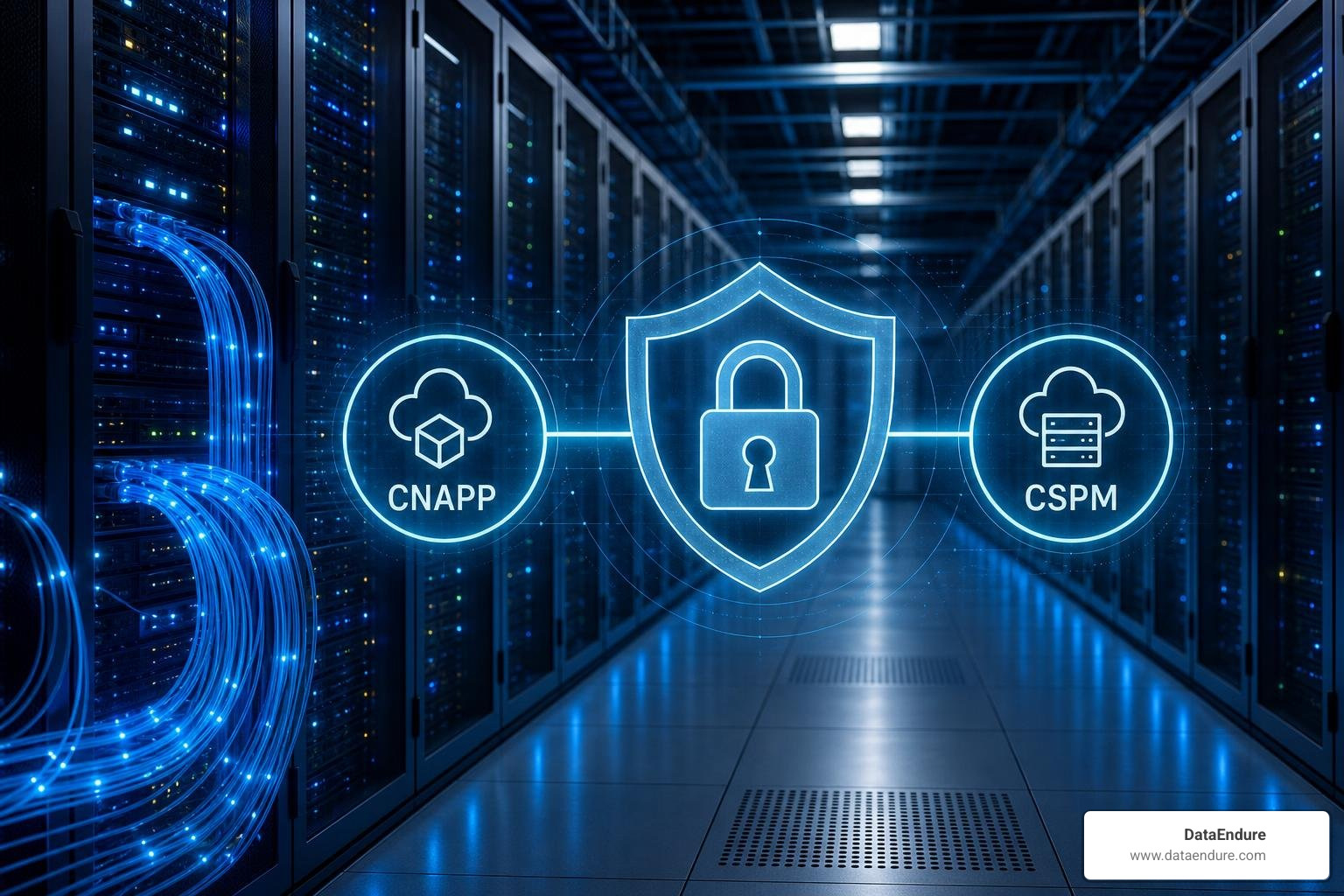
According to the Security Guidance for Cloud Computing v5 | CSA, these platforms consolidate multiple security capabilities into a single pane of glass. Rather than managing separate tools for container scanning, posture management, and threat detection, a unified CNAPP helps security teams prioritize risks based on actual business context and verified exploit paths.
Continuous Monitoring for Misconfigurations
Misconfigurations — such as leaving an Amazon S3 bucket open to the public or exposing administrative ports to the entire internet — are the single most common cause of cloud data breaches.
Because cloud environments are constantly changing as developers deploy new code, you cannot rely on periodic security audits. You need continuous, automated monitoring.
- Automate Configuration Audits: Use CSPM tools to continuously scan your cloud infrastructure against industry benchmarks (such as the CIS Foundations Benchmarks).
- Implement Guardrails and Organization Policies: Use centralized policy engines (like Azure Policies or Google Cloud Organization Policies) to prevent developers from accidentally creating insecure resources in the first place. For example, you can write a policy that blocks the creation of any storage bucket with public read access.
- Leverage Agentless Vulnerability Management: Traditional vulnerability scanners required installing software agents on every virtual machine. This can impact performance and is difficult to manage across thousands of ephemeral resources. Modern agentless tools connect directly to your cloud provider’s APIs to scan disk snapshots, giving you complete visibility without operational friction.
As highlighted in the Well-Architected Framework: Security, privacy, and compliance pillar | Cloud Architecture Center | Google Cloud Documentation, continuous monitoring combined with automated remediation allows your organization to detect and fix drift in real time, keeping your security posture aligned with your compliance goals.
Securing Data with Encryption and Post-Quantum Cryptography
Data is your most valuable asset, and protecting it requires a comprehensive encryption strategy.
- Encryption in Transit: Ensure all data moving across the network is encrypted using modern protocols like TLS 1.3 or IPsec VPNs. Never allow legacy, unencrypted protocols (like HTTP or FTP) to access sensitive cloud resources.
- Encryption at Rest: Encrypt all data stored in cloud databases, object storage, and block volumes. Use strong cryptographic standards like AES-256.
- Key Management and Rotation: Do not rely on default, provider-managed keys for your most sensitive data. Use Customer-Managed Keys (CMK) and enforce strict key rotation policies (such as rotating keys every 90 days). Ensure your keys are protected by hardware security modules (HSMs).
- Beware of Unencrypted Metadata: While your main data payload might be encrypted, cloud storage metadata (such as file names, sizes, and custom tags) is often stored in plain text. Never write sensitive information, such as PII or API keys, into resource metadata.
Preparing for the Future: Post-Quantum Cryptography (PQC)
As we look toward the future, traditional encryption algorithms are facing a massive threat from quantum computing. Within the next decade, quantum computers will likely be capable of breaking standard asymmetric encryption (like RSA and ECC).
This has led to the discussion of “harvest now, decrypt later” scenarios, where encrypted data could be acquired today with the intention of decrypting it once quantum computing technology matures.
To mitigate this risk, forward-thinking organizations are beginning to transition to Post-Quantum Cryptography (PQC) standards. When selecting cloud vendors and designing new applications, prioritize those that support quantum-resistant algorithms to ensure your long-term data remains secure.
To learn more about keeping your data safe from these emerging threats, read our guide: Don’t Let Your Data Drift Away with a Cloud Security Course.
Compliance, Governance, and Incident Response in the Cloud
Deploying workloads to the cloud does not absolve you of your regulatory obligations. Whether you must comply with GDPR, HIPAA, or PCI DSS, you must be able to prove that your cloud environment meets strict security and privacy standards.
To maintain compliance, you should implement security by design. As explained in Implement security by design | Cloud Architecture Center | Google Cloud Documentation, this means building compliance checks directly into your deployment pipelines. By using Infrastructure as Code (IaC) templates that are pre-vetted for compliance, you ensure that every resource deployed is secure by default.
| Framework | Target Industry / Data | Key Cloud Requirements |
|---|---|---|
| GDPR | EU Citizen Data | Data residency controls, encryption, rapid breach notification within 72 hours. |
| HIPAA | Healthcare (PHI) | Strict IAM, detailed audit logging, data encryption at rest and in transit. |
| PCI DSS | Payment Card Data | Network segmentation, continuous vulnerability scanning, file integrity monitoring. |
Incident Response and Disaster Recovery
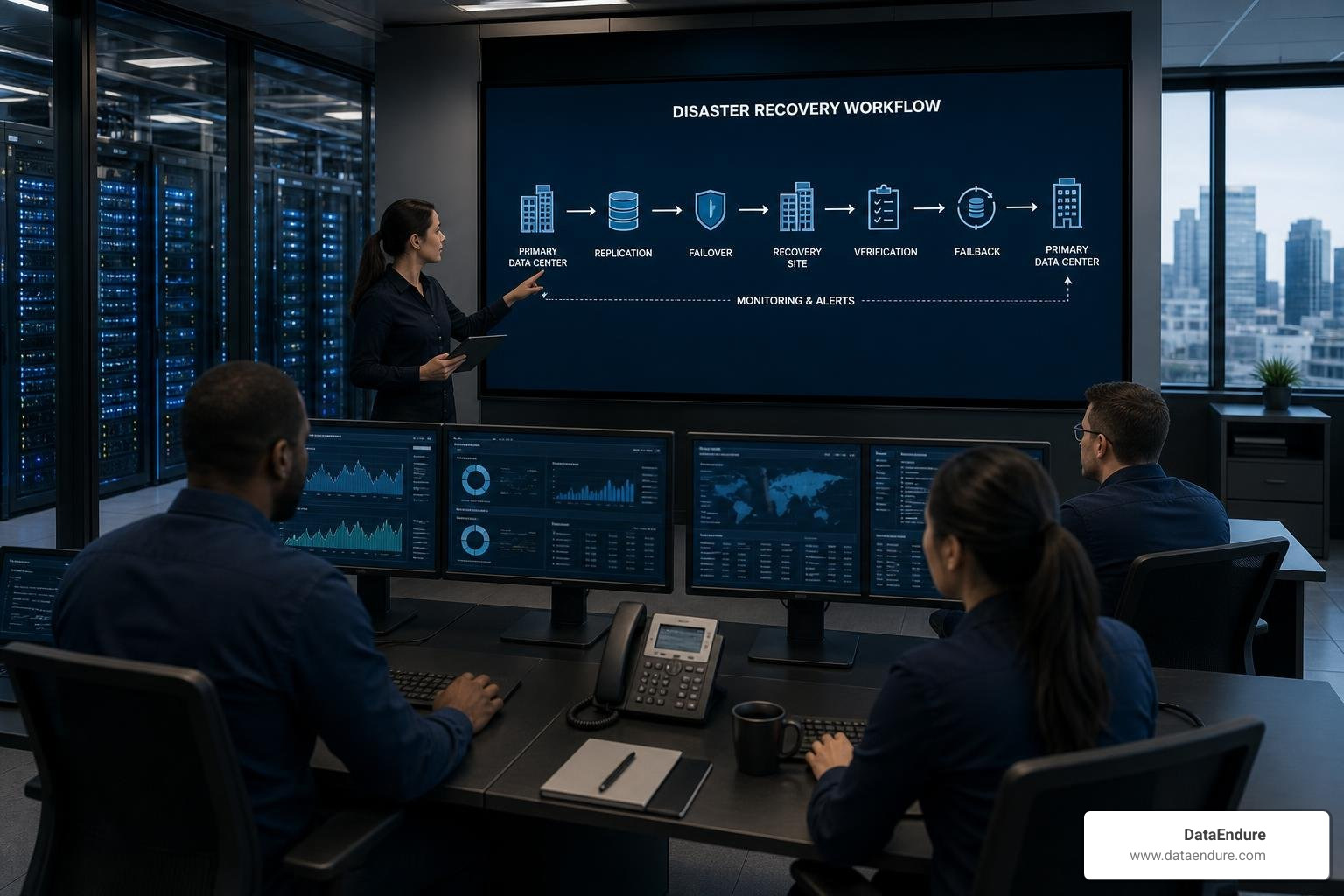
Even with the best preventive controls, breaches can happen. Your ability to detect, contain, and recover from an incident determines the overall impact of a security event on business operations.
- Establish Clear Incident Response Playbooks: Create specific, step-by-step playbooks for common cloud scenarios, such as compromised credentials, ransomware, or exposed storage buckets.
- Centralize and Protect Logs: Aggregate logs from all your cloud accounts, applications, and networks into a centralized, write-once-read-many (WORM) repository. This prevents attackers from deleting their tracks if they compromise an administrator account.
- Automate Detection and Response: Use security orchestration, automation, and response (SOAR) tools to automatically contain threats. For example, if an administrative credential is used from an anomalous location, your system should automatically disable the credential and alert your security team.
- Test Your Backups Regularly: Implement a robust backup and disaster recovery strategy. Backups should be isolated (immutable and stored in a separate account or region) to protect them from ransomware. Most importantly, test your restoration process frequently — a backup is only useful if you can restore it quickly under pressure.
To balance the costs of high-availability disaster recovery with your overall business outcomes, review our strategic insights on Cloud Computing in Motion: Balancing Cost, Outcomes, and Innovation.
Frequently Asked Questions about Cloud Security
What is the difference between the shared responsibility model and the shared fate model?
The shared responsibility model draws a hard line between what the cloud provider secures (the infrastructure) and what the customer secures (the applications and data). The shared fate model is a more collaborative evolution. Under shared fate, the cloud provider actively helps the customer secure their portion of the cloud by providing secure-by-default blueprints, automated guardrails, and risk-sharing tools.
How does micro-segmentation prevent lateral movement in cloud networks?
Traditional network security isolates broad zones (macro-segmentation). If an attacker breaches a single server within that zone, they can easily access everything else in that segment. Micro-segmentation creates highly granular, isolated security zones around individual workloads or services. Even if an attacker compromises one container, strict, policy-defined firewall rules prevent them from moving laterally to access other sensitive resources.
Why is post-quantum cryptography becoming necessary for cloud data protection?
Future quantum computers will have the processing power to break current cryptographic standards (like RSA). This addresses the risk of data being acquired today with the intent of decrypting it once quantum technology becomes available. Transitioning to Post-Quantum Cryptography (PQC) standards ensures your data remains protected against these future decryption capabilities.
Achieving Digital Resilience in the Cloud
Implementing and managing these cloud computing security best practices requires a structured approach to digital resilience. Organizations often face challenges such as tool sprawl, alert fatigue, and resource constraints when securing complex cloud environments.
To address these challenges, building digital resilience involves focusing on integration, simplified workflows, and continuous improvement across security, data, and infrastructure. A holistic strategy helps organizations:
- Improve Detection and Response Times: Establishing clear processes to identify and contain threats efficiently.
- Minimize Alert Fatigue: Utilizing correlation and automation to help security teams focus on high-priority events.
- Streamline Deployment: Integrating security checks early in the lifecycle to maintain a strong posture without delaying operations.
By focusing on a resilient foundation, organizations can manage cloud migration risks and support ongoing business innovation.
For more information on structuring these protections, explore resources on cloud security services.