Why Evaluating Threat Protection in 30 Days Is a Practical Business Step
If you’re responsible for your organization’s security, threat protection deploy 30 days trials give you a practical way to understand whether an approach fits your environment — before you commit to anything.
Here’s a quick answer for what to expect and look for:
What a 30-day threat protection deployment should help you assess:
- Activation in minutes to hours — not weeks of professional services
- Observed detection results — ransomware risk reduction, faster threat identification, fewer false positives
- Integration with your existing stack — SIEM, EDR, identity, cloud, and network tools
- Measurable baselines — alert volume, dwell time, time-to-detect, and analyst workload
- Clear conversion path — simple pricing, policy export, and a decision-ready ROI summary
Most security teams in regulated industries are dealing with the same pressure: a growing attack surface, too many tools that don’t talk to each other, and not enough analysts to keep up. Alert fatigue is real — some organizations report receiving so many daily alerts that the vast majority go uninvestigated. At the same time, detection gaps can persist longer than teams want.
A 30-day trial adds practical evidence. Instead of buying based on a demo, you get live telemetry from your real environment. You see how a solution handles your actual threats, your actual users, and your actual workflows.
That said, not all trials are structured equally. Some give you a limited experience. Others drop you in with little support. Well-run evaluations pair you with deployment guidance, connect to your existing tools early, and show measurable outcomes within the first week.
This guide walks through common threat protection deployment models, how to run a structured 30-day evaluation, and how to measure whether a solution earns a permanent place in your stack.
Easy threat protection deploy 30 days word list:
What threat protection deploy 30 days Should Prove Before You Buy
A 30-day threat protection deployment can help answer one question: does this improve our security posture without making operations harder?
That means evaluating outcomes, not just features. A good trial should show whether the solution can reduce risk, detect threats faster, integrate cleanly, and support compliance evidence. A well-run trial should also show whether your team can actually live with it after day 30.
Viewed through a resilience lens, the goal is not to add another noisy tool. The goal is to create alignment across security, data, cloud, network, identity, and infrastructure so your business can move faster with less risk.
| Deployment model | Activation speed | Coverage | Integrations | Support model | ROI indicators |
|---|---|---|---|---|---|
| Managed detection and response | Minutes to days | Endpoint, identity, cloud, network, logs | SIEM, EDR, IAM, cloud, ticketing | 24/7 SOC and experts | Faster detection, reduced alert burden |
| Endpoint and XDR | Hours to days | Workstations, servers, mobile, endpoint behavior | SIEM, SOAR, EDR, cloud console | Guided onboarding or self-service | Ransomware blocking, faster containment |
| DNS and network defense | Minutes to days | DNS, remote users, IoT, OT, unmanaged devices | DNS, firewall, SIEM, DDI, XDR | Technical enablement | Earlier threat blocking, fewer risky domains |
| Zero Trust controls | Days to weeks | Applications, privileges, storage, network access | Endpoint, SIEM, ticketing, IAM | Engineer-assisted rollout | Reduced unauthorized execution |
| Firewall and web protection | Days to weeks | IPS, malware, URL, DNS, SaaS, DLP | Firewall fabric, SIEM, sandbox | Partner or vendor-assisted | Fewer C2 callbacks, better web control |
| Vulnerability management | Hours to days | Assets, exposures, misconfigurations, risk | Endpoint, cloud, scanners, compliance tools | Admin-guided setup | Better patch prioritization |
Why a 30-Day Deployment Beats a Demo
A demo shows what a product can do in a clean environment. Your environment is not clean. Nobody’s is. If it were, cybersecurity would be a much calmer profession and coffee budgets would drop dramatically.
A live deployment reveals what matters:
- Whether endpoint sensors install cleanly across real devices
- Whether DNS visibility catches malicious or suspicious domains
- Whether identity signals expose impossible travel, privilege misuse, or credential abuse
- Whether cloud connectors surface misconfigurations and risky workloads
- Whether your SOC, help desk, and IT admins can use the workflows
- Whether executives can understand the value in business terms
This is especially important for CISO and IT director teams managing tool sprawl. A 30-day evaluation should show which tools strengthen your stack and which ones create duplicate work.
Benefits to Measure in the First Month
The strongest 30-day deployments show progress in both security outcomes and operational efficiency.
Track:
- Alert reduction and false-positive reduction
- Time-to-detect and time-to-triage
- Time-to-contain for high-risk events
- Dwell time reduction
- Ransomware exposure reduction
- Analyst hours saved
- Compliance evidence produced
- Coverage across endpoints, cloud, identity, and network
- Ease of integration with current systems
Some vendors may cite published outcomes such as alert reduction, lower dwell time, reduced ransomware exposure, or faster threat detection. Treat those as context to validate in your own environment, not as guarantees.
For more practical guidance, see our guide on reducing alert noise.
The Best-Fit Evaluation Team
A 30-day deployment fails when it is treated as “just a security tool test.” It succeeds when the right people are involved early.
Your evaluation team should include:
- CISO or security executive sponsor
- IT director or infrastructure leader
- SOC lead or incident response owner
- Endpoint administrator
- Identity and access owner
- Network lead
- Cloud platform owner
- Help desk lead
- Compliance or risk lead
- Finance or procurement stakeholder
- Business owner for pilot users
Help desk involvement is especially important. If enforcement policies create tickets faster than the team can respond, the trial can lose support before it proves value.
Threat Protection Models to Evaluate in 30 Days

A strong security program is layered. No single tool stops every attack path. The right 30-day evaluation often includes multiple controls working together: endpoint, identity, DNS, network, cloud, vulnerability management, and MDR.
A vendor-neutral assessment helps technical leaders avoid “one more console syndrome.” The goal is to curate the right stack instead of forcing a one-size-fits-all answer.
Managed Detection and Response Platform
Managed detection and response, or MDR, is one way to improve security operations because it adds skilled analysts, threat hunters, and response workflows around your existing telemetry.
In a 30-day MDR evaluation, look for:
- 24/7 SOC monitoring
- AI-assisted alert triage
- Human-led investigation
- Threat hunting
- Ransomware containment workflows
- Identity attack response
- Zero-day detection support
- Bring-your-own-license support for existing tools
- Broad integrations across endpoint, identity, vulnerability, cloud, network, and SIEM tools
Some modern MDR platforms can connect to existing signals quickly and support many technology integrations. The value is not just detection; it is reducing the operational burden on your internal team.
For practical rollout ideas, read Enterprise MDR deployment quick wins.
Endpoint and XDR Protection
Endpoint and XDR platforms help detect and block threats on workstations, servers, and mobile devices. During a 30-day evaluation, prioritize coverage and response speed.
Capabilities to assess include:
- Next-generation antivirus
- Endpoint detection and response
- Device control
- Mobile protection
- Behavioral analytics
- Ransomware blocking
- Exploit prevention
- Cloud-based console
- Lightweight sensor deployment
- Offline protection for endpoints when disconnected
Some endpoint trials are cloud-based and can be activated quickly, with sensors deployed through standard endpoint management tools. Public endpoint trial guidance recommends role-based access control, least-privilege permissions, endpoint onboarding, capability configuration, and detection testing.
Preemptive DNS and Network Threat Defense
DNS protection is powerful because it sees requests before users connect to dangerous destinations. It can also protect devices that cannot run agents, including some IoT, OT, and unmanaged systems.
Evaluate:
- Protective DNS
- Predictive domain intelligence
- Domain generation algorithm detection
- DNS tunneling detection
- C2 blocking
- Remote user coverage
- IoT and OT visibility
- User and device attribution
- SIEM and XDR integrations
If a DNS or network security provider presents performance metrics, validate them against your own environment. Useful trial measures include blocked risky domains, false-positive rates, time-to-investigation, user attribution quality, and integration value.
Zero Trust Application and Access Control
Zero Trust application control flips the model from “allow unless known bad” to “deny by default, allow by exception.” That can be useful, but it must be deployed carefully.
During a 30-day trial, look for:
- Application allowlisting
- Learning mode
- Ringfencing
- Elevation control
- Storage control
- Network control
- Policy previews
- Exception governance
- Support for Windows, macOS, Linux, cloud, and hybrid environments
The most common mistake is rushing enforcement. Start in learning mode, review policy previews with department leads, and design exceptions as if they could be misused. That sounds suspiciously like pessimism, but in security we call it “good architecture.”
Firewall, Secure Web, and Threat Intelligence Bundles
Firewall and secure web bundles can provide network-layer control. They are especially useful when you need to consolidate IPS, malware inspection, URL filtering, DNS filtering, sandboxing, and SaaS controls.
Evaluate coverage for:
- Intrusion prevention
- Advanced malware protection
- URL filtering
- DNS filtering
- Anti-botnet and C2 blocking
- Cloud sandboxing
- SaaS security
- Data loss prevention
- Attack surface visibility
- Virtual patching
- IoT and OT device visibility
Sandboxing is especially useful for zero-day protection because unknown files can be held briefly for verdict analysis before being allowed into the environment.
Vulnerability and Exposure Management
Vulnerability management helps answer: where are we exposed, which risks matter most, and what should we fix first?
A 30-day evaluation should cover:
- Asset inventory
- Vulnerability discovery
- Exploitability context
- Risk scoring
- Patch prioritization
- Attack surface reduction
- Compliance mapping
- Security recommendations
- Executive reporting
Some vulnerability management trials can become available within hours after activation. Public vulnerability management trial guidance notes that service availability can take up to six hours after activation and that administrators should confirm role requirements before starting.
How to Run a threat protection deploy 30 days Evaluation
A fast deployment still needs structure. Thirty days is enough time to prove value, but not if the first two weeks are spent asking, “Who owns the admin login?”
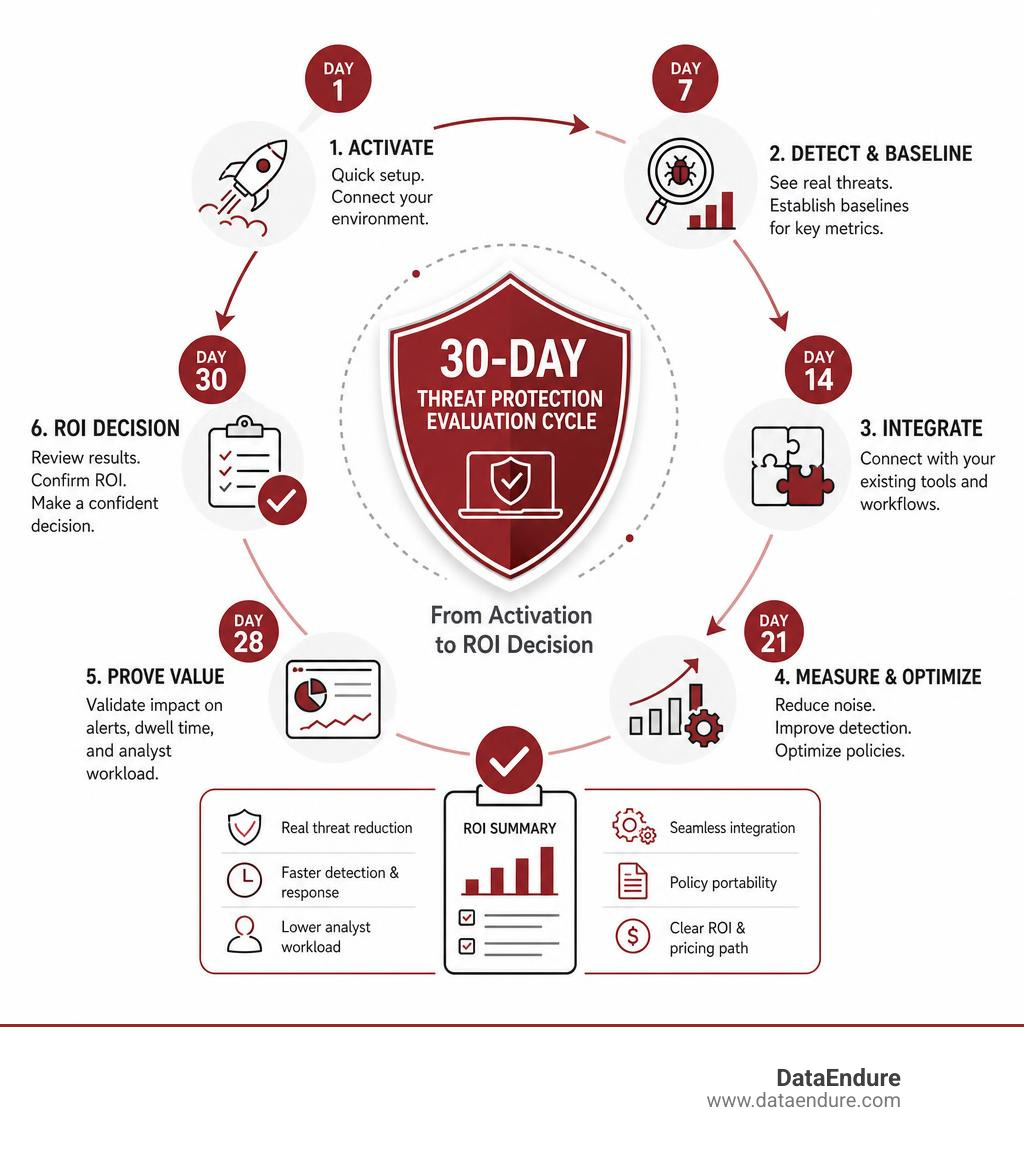
Use this milestone plan.
- Define scope, pilot groups, success metrics, and executive sponsor.
- Activate licenses and admin roles.
- Connect identity, endpoint, DNS, cloud, SIEM, and ticketing systems.
- Establish baseline alert volume and incident workflows.
- Deploy sensors or agentless controls.
- Run in detection or learning mode.
- Review false positives and business impact.
- Test ransomware, phishing, identity, and malicious domain scenarios safely.
- Measure detection, triage, containment, and reporting performance.
- Produce an executive ROI and resilience summary.
Week 1: Activate, Integrate, and Establish Baselines
Week 1 is about visibility.
Complete:
- License activation
- Admin role setup using least privilege
- Sensor deployment to pilot endpoints
- DNS forwarding or protective DNS configuration
- Cloud connectors
- Identity integration
- SIEM connection
- Ticketing workflow
- Baseline alert capture
- Asset inventory review
Do not skip baselines. Without them, you cannot prove improvement.
Week 2: Tune Policies Without Breaking Operations
Week 2 is where fast deployments either build trust or create chaos.
Focus on:
- Learning mode
- Detection mode
- Allowlisting review
- Policy previews
- Help desk training
- Business unit feedback
- Exception design
- False-positive review
- Change management
If you are testing Zero Trust controls, involve department leaders before enforcement. People are much more forgiving when they know what is changing before their payroll app gets blocked.
Week 3: Test Detection, Blocking, and Response
Week 3 validates whether protection works under realistic conditions.
Test safely and with approval:
- Ransomware simulation
- Phishing test campaigns
- Credential abuse scenarios
- Malicious domain access
- Exploit-like behavior
- Lateral movement patterns
- Endpoint isolation
- Account containment
- Incident escalation
- Executive notification workflows
The goal is not to “catch the tool failing.” The goal is to understand where controls work, where processes need tuning, and where humans must stay in the loop.
Week 4: Measure ROI and Decide What Stays
Week 4 turns technical findings into business decisions.
Measure:
- Alert reduction
- Time-to-detect
- Time-to-triage
- Time-to-contain
- Prevented incidents
- Analyst hours saved
- Tool overlap reduced
- Compliance artifacts created
- Ransomware exposure reduction
- Business disruption avoided
If compliance is part of the driver, align your findings with the steps in Breach protection 30-day compliance countdown.
Core Features and Threats a 30-Day Trial Should Cover

A 30-day trial should cover the threats most relevant to your business, not just the easiest features to turn on.
Protections to Consider During the Trial
Your evaluation should include as many of these as possible:
- Next-generation antivirus
- EDR
- MDR
- XDR
- Protective DNS
- Vulnerability management
- Identity monitoring
- Sandboxing
- Network controls
- SaaS security
- Cloud workload visibility
- Endpoint isolation
- Incident response workflows
Threat Types to Validate
Based on scope, consider validation against:
- Ransomware
- Zero-day exploit behavior
- Identity attacks
- Credential theft
- Phishing
- Business email compromise indicators
- DNS tunneling
- Command-and-control traffic
- Malicious domains
- Risky applications
- Unauthorized access
- Cloud misconfigurations
- Unmanaged device activity
Integration Requirements for Existing Stacks
A solution that cannot integrate becomes another island. Islands are great for vacations, not for security operations.
Confirm integrations with:
- SIEM
- SOAR
- EDR
- IAM
- Firewalls
- Cloud platforms
- Email security
- Vulnerability scanners
- Ticketing systems
- Asset management
- APIs and automation tools
This is where a multi-disciplinary background matters. Security does not operate alone. It depends on identity, infrastructure, cloud, network, and data systems working together.
Support, Training, and Common Deployment Pitfalls
The technology matters. The rollout matters more.
Support to Expect During the First 30 Days
A strong trial should provide:
- Dedicated onboarding engineer
- Guided setup sessions
- 24/7 support or clear escalation paths
- Technical documentation
- Admin training
- Detection tuning
- Integration assistance
- Weekly check-ins
- Executive reporting templates
- Clear end-of-trial options
If the vendor or partner hands you a login and disappears, that is not a trial. That is a scavenger hunt.
Pitfalls That Derail Fast Deployments
Common problems include:
- Unclear scope
- No executive sponsor
- Poor asset inventory
- Tool overlap confusion
- Rushed enforcement
- No help desk involvement
- Weak success metrics
- Unmanaged exceptions
- Missing rollback plan
- Incomplete offboarding plan
How to Avoid Business Disruption
Use a phased approach:
- Start with pilot groups.
- Use detection or learning mode before enforcement.
- Review policy previews with department leads.
- Train the help desk before users call.
- Communicate expected changes.
- Schedule change windows.
- Document approvals.
- Prepare rollback procedures.
- Review exceptions weekly.
For a broader resilience framework, read Four steps to fortify against cyber attack.
Frequently Asked Questions About threat protection deploy 30 days
How quickly can threat protection be deployed in 30 days?
Many modern solutions can be activated in minutes to hours, especially cloud consoles, MDR integrations, DNS controls, and vulnerability management trials. Endpoint rollouts often take a few days depending on device count, management tooling, change windows, and existing antivirus requirements.
Large or complex environments may need staged onboarding. That is normal. The key is to establish meaningful coverage in week 1, tune in week 2, test in week 3, and decide in week 4.
What happens at the end of a 30-day threat protection trial?
At the end of the trial, your team should have:
- An executive summary
- ROI findings
- Alert and incident metrics
- Integration status
- Policy recommendations
- Coverage gaps
- Conversion or extension options
- Sensor removal or offboarding plan if not continuing
- Roadmap for broader deployment
If you continue, the next step is usually moving from pilot scope to production rollout. If you do not continue, offboard devices, remove connectors, export useful data where allowed, and document lessons learned.
How should leaders measure success after 30 days?
Leaders should measure success in business and operational terms, not just technical detections.
Use metrics such as:
- Alert reduction
- Detection speed
- Containment time
- Ransomware exposure reduction
- Analyst workload reduction
- Compliance evidence created
- Business disruption avoided
- Tool consolidation potential
- Total operational cost reduction
- Improved resilience outcomes
The best result is not “we bought a tool.” The best result is “we reduced risk, simplified operations, and improved readiness.”
Conclusion
A 30-day threat protection deployment should prove value in your real environment, with your users, your tools, and your risks. It should reduce noise, speed up detection, improve response, and give leadership a clear view of what comes next.
DataEndure helps organizations in Santa Clara, Silicon Valley, and beyond approach this decision with alignment over complexity. With 40+ years of experience across security, data, cloud, network, and infrastructure, we help technical leaders evaluate resilient, AI-ready environments without adding unnecessary tool sprawl.
Our approach is vendor-agnostic and outcome-driven. We help teams evaluate detection speed, alert fatigue, managed protection deployment, and the connection between cybersecurity investments and business resilience.
Ready to evaluate what belongs in your stack? Talk to an expert about managed security and MDR.