Why Cloud Security Best Practices Matter More Than Ever in 2026
Following cloud security best practice is no longer optional — it’s the difference between a resilient organization and a costly breach.
Here are the core cloud security best practices every organization should implement:
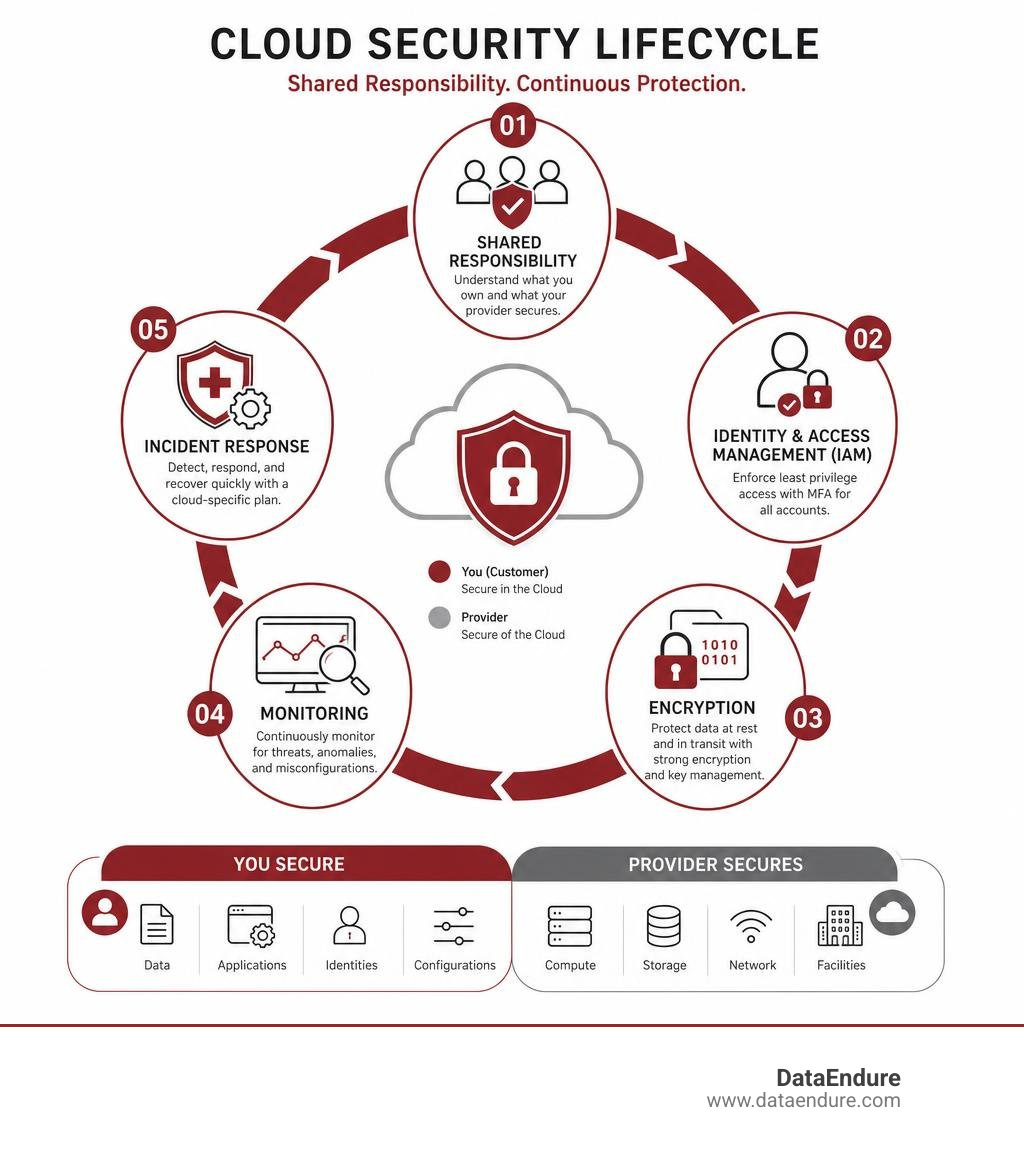
- Understand the shared responsibility model — know what your cloud provider secures and what you own
- Enforce least privilege access — limit every user and machine identity to only what it needs
- Enable multi-factor authentication (MFA) — use non-phishable factors for all admin accounts
- Encrypt data at rest and in transit — use TLS 1.2+ and customer-managed encryption keys
- Monitor for misconfigurations continuously — don’t rely on one-time audits
- Segment your network — use micro-segmentation and a zero-trust approach to limit lateral movement
- Secure containers, APIs, and workloads — scan images in CI/CD pipelines before deployment
- Manage third-party and MSP risk — audit all vendor access with strict IAM policies
- Align to compliance frameworks — CIS Benchmarks, NIST 800-53, and GDPR provide proven control structures
- Have a cloud-specific incident response plan — automated containment is essential when every minute counts
Most organizations move to the cloud for good reasons. The cost savings alone are significant — 94% of companies report lower upfront costs after cloud adoption, and IT total cost of ownership can drop by 30–40%. But those same organizations often underestimate how much of the security burden stays with them.
The cloud provider secures the infrastructure. You secure everything running on top of it. That line gets blurry fast — especially when you’re managing multiple cloud environments, a growing stack of security tools, and a team already stretched thin.
The result? Configuration drift. Privilege creep. Alerts that pile up faster than anyone can act on them. And real threats slipping through undetected. According to industry data, 65% of organizations experienced a cloud-related incident in the past year — but only 9% detected it within the first hour.
This guide cuts through the noise. It covers the foundational practices that protect cloud environments in 2026, written for IT leaders who need clear, actionable answers — not another vendor pitch.
Cloud security best practice terms to remember:
Establishing the Foundation: The Shared Responsibility Model
Before deploying a single workload, writing a line of code, or configuring a firewall, you must understand the rules of the road. In cloud environments, security operates under a cooperative agreement known as the Shared Responsibility Model.
At its simplest, this model dictates that the cloud service provider (CSP) is responsible for the security of the cloud, while you—the customer—are responsible for security in the cloud.
The provider takes care of the physical security of the data centers, the underlying hardware, hypervisors, and core networking infrastructure. Your job is to secure what you put into that space: your data, code, operating systems, network configurations, and identity access management policies.
Failing to grasp where the provider’s responsibility ends and yours begins is one of the most common ways breaches occur. Organizations often assume that because they are running on a secure cloud infrastructure, their applications are inherently safe. This misconception is where critical gaps form. To understand this division of labor in depth, you can read our breakdown of Shared Responsibility for Cloud Security.
To design architectures that successfully implement these divided controls, technical leaders frequently align their strategies with the AWS Well-Architected Framework Security Pillar. This framework helps teams establish “security invariants”—control objectives applied universally across all cloud accounts to prevent unauthorized regions from being activated or logging systems from being turned off.
Defining Boundaries in IaaS, PaaS, and SaaS
The boundaries of who manages what shift dramatically depending on the service model you use.
- Infrastructure as a Service (IaaS): In this model (e.g., AWS EC2, Google Compute Engine), you inherit the least amount of security from the provider. They secure the physical host and virtualization layer, but you are entirely responsible for the guest operating system, patching, runtime environments, application security, database configurations, and network traffic rules.
- Platform as a Service (PaaS): Here (e.g., AWS Elastic Beanstalk, Google App Engine), the provider takes on more of the burden. They manage and patch the operating system and runtime container. Your primary responsibilities shrink to securing the application code itself, managing data classification, and controlling access permissions.
- Software as a Service (SaaS): In a SaaS model (e.g., Microsoft 365, Salesforce), the provider manages almost the entire stack—from the physical layer up to the application code. Your remaining, yet highly critical, duties are identity management, user access control, and monitoring what data enters and leaves the platform.
Understanding these shifts is essential to preventing costly blind spots. Here is how these responsibilities compare across the three primary cloud models:
| Security Layer | Infrastructure as a Service (IaaS) | Platform as a Service (PaaS) | Software as a Service (SaaS) |
|---|---|---|---|
| Physical & Infrastructure Security | Provider | Provider | Provider |
| Operating System & Patching | Customer | Provider | Provider |
| Network Controls & Firewalls | Customer | Shared | Provider |
| Application & Code Security | Customer | Customer | Provider |
| Identity & Access Management | Customer | Customer | Customer |
| Data Classification & Governance | Customer | Customer | Customer |
Identity and Access Management: The New Security Perimeter
In traditional on-premises networks, security teams relied on physical perimeters—walls, gates, and firewalls—to keep bad actors out. In the cloud, that perimeter has completely dissolved. Identity is the new perimeter.
Identity and Access Management (IAM) is the gatekeeper of your cloud resources. If an attacker compromises a highly privileged cloud credential, they don’t need to exploit a complex software vulnerability; they can simply log in and start exfiltrating data or deploying ransomware.
To establish a strong identity foundation, you should check out our Beginner’s Guide to Cloud Security, which covers the basics of setting up clean access boundaries.
The first rule of modern IAM is enforcing Multi-Factor Authentication (MFA) across all accounts, with absolute zero exceptions. However, not all MFA is created equal. Standard SMS-based or mobile app push notifications are increasingly vulnerable to sophisticated phishing and SIM-swapping attacks.
In 2026, the gold standard is implementing non-phishable MFA—such as WebAuthn or physical hardware keys (like YubiKeys)—especially for administrative, root, and highly privileged service accounts.
Implementing Least Privilege as a Cloud Security Best Practice
Enforcing the Principle of Least Privilege (PoLP) is a foundational cloud security best practice. It dictates that every user, service, and machine identity should only have the absolute minimum permissions required to perform its specific task—and nothing more.
In practice, this is incredibly difficult to maintain. Organizations frequently suffer from “privilege creep,” where employees accumulate permissions over time as they change roles, but old access rights are never revoked. To combat this, you must adopt a systematic approach to access control:
- Implement Role-Based Access Control (RBAC): Group permissions into clearly defined roles rather than assigning permissions to individual users.
- Address Machine Identities: Human users represent only a fraction of your cloud identities. Service accounts, APIs, and automated CI/CD pipelines often hold massive privileges. Audit these machine identities regularly to ensure they cannot be hijacked to move laterally.
- Utilize Just-In-Time (JIT) Access: Instead of granting permanent administrator permissions, use tools that provision temporary, time-bound access that automatically expires after a task is completed.
- Enforce Separation of Duties: Ensure that no single identity has enough authority to complete a high-risk process alone—such as writing code and deploying it directly to production without peer review.
Hardening the Infrastructure: Network Segmentation and Zero Trust
Once your identity boundaries are established, you must secure the underlying network. Traditional networks relied on a “trusted intranet” model—if you were inside the office network, you were trusted.
The cloud demands a Zero Trust architecture. Under Zero Trust, we operate on the “assume breach” principle. We trust nothing by default—not the network, not the user, and not the device. Every single request for access must be explicitly authenticated, authorized, and encrypted before access is granted.
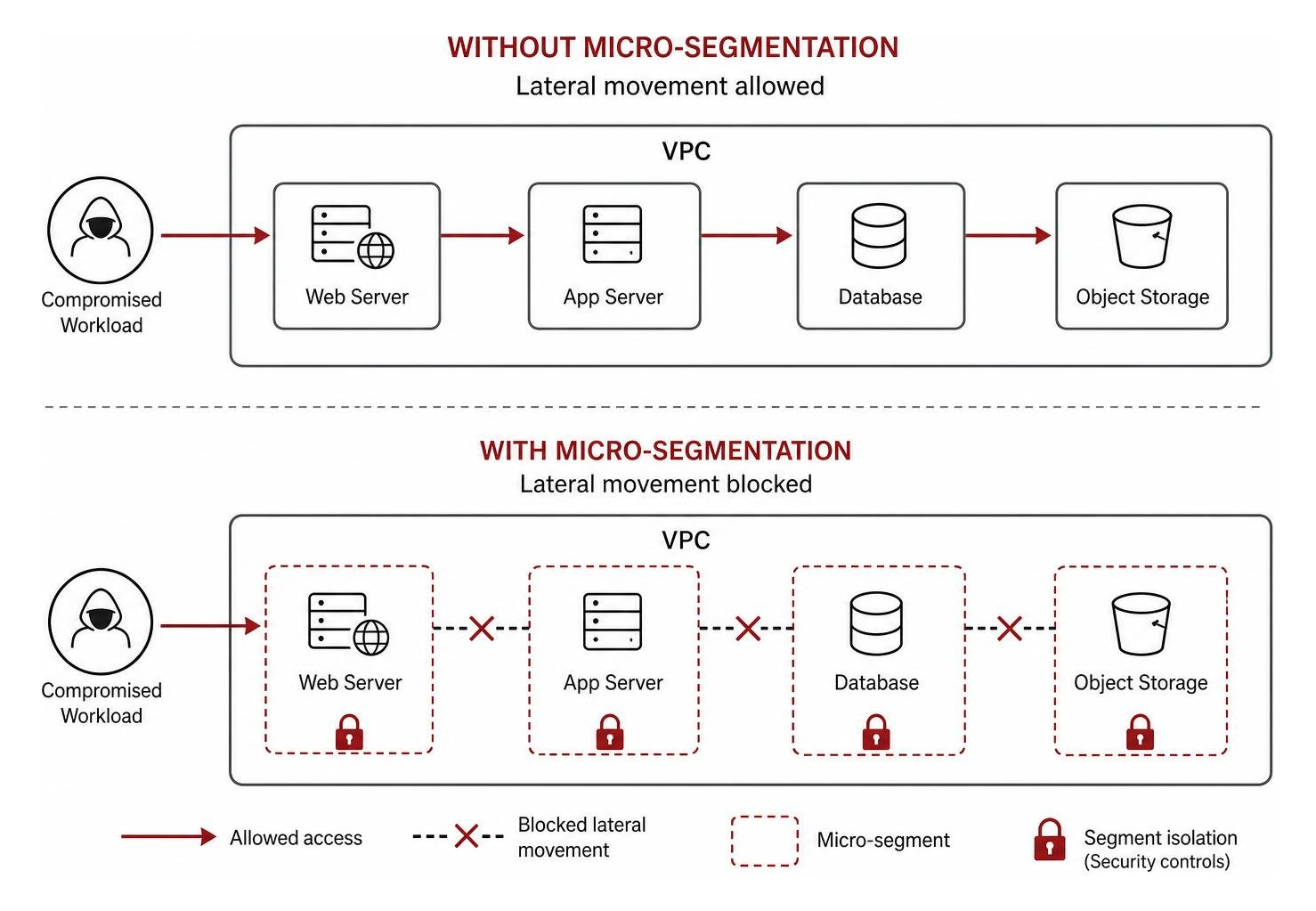
Network segmentation is the practical mechanism that makes Zero Trust possible in the cloud. Instead of one giant virtual private cloud (VPC) where all resources can talk to each other, you must divide your cloud network into smaller, isolated zones.
Macro-segmentation provides the baseline isolation—such as separating development, testing, and production environments into entirely different cloud accounts. Micro-segmentation takes this a step further by isolating individual workloads or microservices from one another, ensuring that even if a single web server is compromised, the attacker cannot move laterally to access the database.
Securing Workloads, Containers, and APIs
Modern cloud architectures rely heavily on microservices, containers (like Kubernetes), and APIs. While these technologies allow for rapid deployment and scalability, they also introduce unique security challenges.
To secure this modern application stack, you must implement specific controls:
- Kubernetes Security Baselines: Containers share the host operating system kernel, making container breakout attacks a real risk. Use hardened, container-optimized OS images. Keep containers stateless and immutable—if a container needs a security patch, rebuild and redeploy it from a clean image rather than modifying it interactively in production.
- Use Distroless Images: Minimize your container attack surface by using “distroless” images that contain only your application and its runtime dependencies, eliminating shell utilities and package managers that attackers use to install malware.
- API Gateways: Secure your APIs by routing all traffic through an API gateway that handles centralized authentication, rate limiting, and threat scanning.
- Vulnerability Scanning: Integrate automated vulnerability scanning directly into your CI/CD pipelines. This ensures that any container image or application code containing known vulnerabilities is flagged and blocked before it ever reaches a production environment.
Data Protection: Encryption and Key Management
Data is your organization’s most valuable asset, making it the primary target for malicious actors. Protecting this data requires a comprehensive encryption strategy that covers all stages of the data lifecycle.
To align your cryptographic controls with enterprise-grade standards, you can refer to the Google Cloud security best practices catalog. This catalog outlines how to structure data management controls to prevent exposure across cloud storage buckets and databases.
A complete cloud encryption strategy must address three distinct states:
- Data in Transit: Any data moving across the network must be encrypted using strong modern protocols. Enforce TLS 1.2 (or ideally TLS 1.3) for all application, database, and API connections. Use firewalls and VPC service controls to block unencrypted HTTP traffic.
- Data at Rest: Data stored in cloud databases, block storage, and object stores must be encrypted using industry-standard AES-256 encryption. Most cloud providers offer default encryption, but for highly sensitive workloads, you should control your own keys.
- Data in Use (Confidential Computing): Historically, data had to be decrypted in system memory while being processed by the CPU, leaving it vulnerable to memory-scraping attacks. Confidential Computing solves this by using hardware-based trusted execution environments to keep data encrypted even while it is actively in use in memory.
Key Management and Rotation as a Cloud Security Best Practice
Encryption is only as secure as the keys used to lock and unlock the data. Leaving your cryptographic keys exposed or poorly managed completely invalidates your encryption efforts.
Implementing robust key management is a critical cloud security best practice. You should utilize your provider’s native Key Management Service (KMS) or cloud-based Hardware Security Modules (HSMs) to generate, store, and protect your keys.
Never hardcode encryption keys, API tokens, or database credentials into your application source code or store them in version control systems. Instead, pull these secrets dynamically at runtime from a dedicated secrets manager.
Furthermore, establish a strict key rotation policy. For highly sensitive data, configure your KMS to automatically rotate encryption keys every 90 days. Always set clear expiration dates for all secrets, and continuously audit key usage logs to detect any unauthorized decryption attempts.
Continuous Posture Management: Monitoring, Misconfigurations, and Compliance
In the cloud, infrastructure is defined as code. While this allows for incredible speed, it also means a single typo in a Terraform template can instantly expose a critical database to the public internet.
Cloud misconfigurations are the leading cause of cloud data breaches. Because cloud environments are dynamic and constantly changing, you cannot rely on manual, periodic security audits. You need continuous monitoring and Cloud Security Posture Management (CSPM) to scan your infrastructure in real-time for configuration drift, open ports, and compliance violations.
To build a comprehensive monitoring strategy, you can read our Detailed Guide to Cloud Security. This guide explains how to tie continuous telemetry collection back to active response workflows rather than letting alerts sit unaddressed on a static dashboard.
Your monitoring should align with established compliance frameworks, such as the Center for Internet Security (CIS) Benchmarks, NIST 800-53, or industry-specific regulations like PCI DSS and GDPR. These frameworks provide a structured checklist of required, recommended, and optional controls to ensure your cloud posture remains resilient.

Mitigating Third-Party and MSP Risks
Modern cloud environments rarely exist in a vacuum. Most organizations rely on Managed Service Providers (MSPs), third-party vendors, and integrated SaaS tools to help manage their infrastructure.
While these partnerships offer operational efficiency, they also introduce significant supply chain risks. Attackers frequently target the “trusted relationships” of third-party vendors to gain administrative access to their client’s cloud environments.
To mitigate these risks, you must implement a strict Vendor Risk Management program:
- Limit Vendor Permissions: Apply the principle of least privilege to all third-party administrative roles. Never grant permanent, blanket administrative access to external vendors.
- Audit Third-Party Access: Implement strict auditing and real-time monitoring specifically for tasks performed by third-party credentials.
- Set Access Expirations: Time-box vendor access, ensuring credentials automatically deactivate when a specific project or contract ends.
Incident Response: Preparing for Cloud-Specific Threats
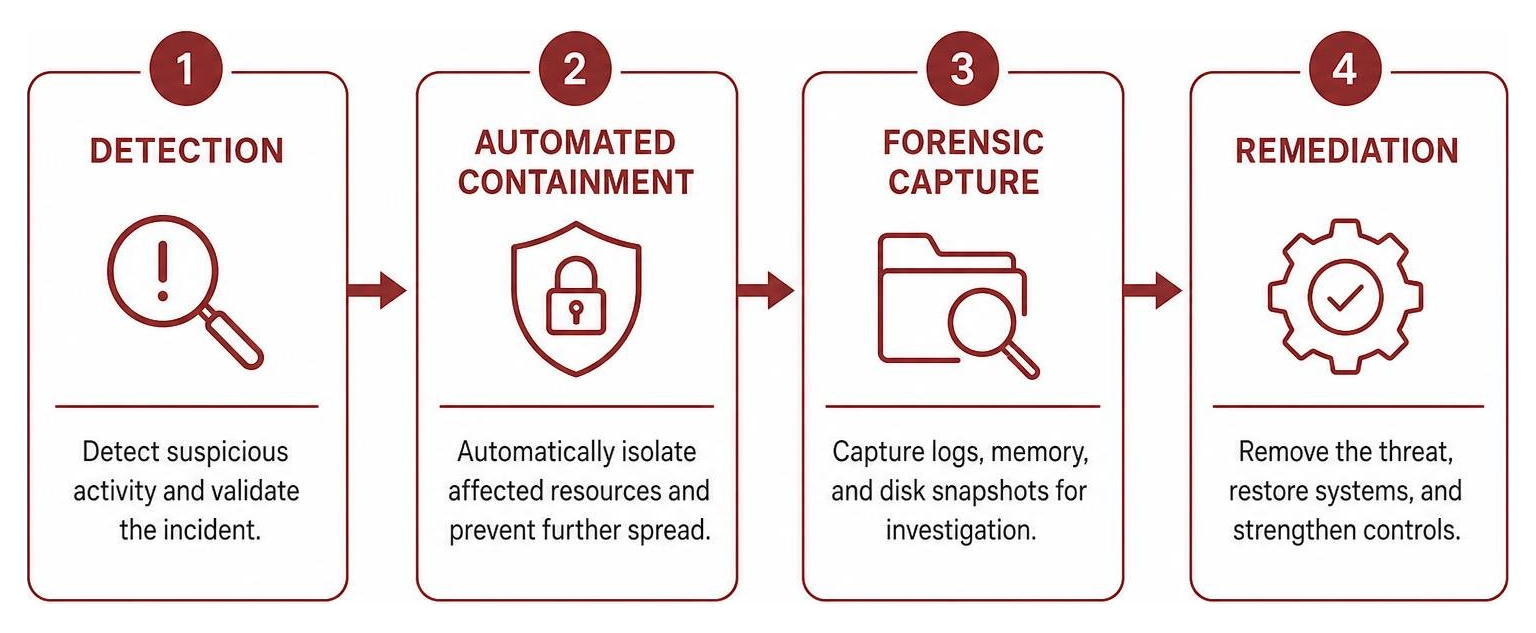
Despite your best preventative efforts, you must operate under the assumption that a security incident will eventually occur. When it does, your survival depends on how quickly you can detect, contain, and remediate the threat.
Cloud incident response is fundamentally different from traditional on-premises response. You cannot physically pull the network plug on a compromised virtual server. Instead, your response must be software-defined, automated, and lightning-fast.
A mature cloud incident response plan includes:
- Centralized Logging: Ensure all cloud audit logs, VPC flow logs, and application logs are sent to a secure, centralized repository that cannot be modified or deleted by compromised administrative accounts.
- Automated Containment: Build automated workflows that can instantly isolate a compromised virtual machine, revoke a hijacked IAM credential, or block a malicious IP address at the firewall level.
- Cloud Forensics: Prepare your team to conduct digital forensics on ephemeral resources. If a compromised container is automatically destroyed and replaced, your evidence disappears with it. You must have systems in place to capture memory dumps and disk snapshots instantly when an alert is triggered.
Implementing rapid breach detection is critical to minimizing exposure windows. Utilizing a dedicated or managed Security Operations Center (SOC) can help organizations detect and initiate containment on threats quickly, reducing the operational burden and alert fatigue that often impact internal IT teams.
Frequently Asked Questions About Cloud Security Best Practice
What is the single most common cloud security misconfiguration?
The most common cloud security misconfiguration is leaving cloud storage buckets (such as AWS S3 or Google Cloud Storage) or databases publicly accessible to the internet. This usually happens when default security settings are accidentally overridden during migration or development. Always enforce organization-wide policies that globally block public access to storage resources unless explicitly required and approved.
How does zero trust differ from traditional network security in the cloud?
Traditional network security relies on a “castle-and-moat” approach, where resources inside the network perimeter are trusted by default. Zero Trust completely abandons this concept. It assumes that threats already exist inside the network. Under Zero Trust, every user, device, and workload must be continuously verified, authenticated, and authorized, and all network traffic must be segmented and encrypted, regardless of where the request originates.
Why is a cloud security assessment necessary for mature organizations?
Even mature organizations with dedicated IT teams suffer from visibility gaps, tool sprawl, and configuration drift over time. A professional Cloud Security Assessment provides an objective, expert evaluation of your entire cloud footprint. It uncovers hidden blind spots, identifies over-privileged service accounts, flags compliance violations, and provides a prioritized roadmap to harden your defenses before attackers can exploit those gaps.
Conclusion
Securing a cloud environment requires a continuous, structured approach rather than managing a disconnected set of security tools. By focusing on foundational practices—such as understanding shared responsibility, enforcing least privilege, encrypting data, and maintaining continuous monitoring—organizations can build a resilient security posture.
Implementing these strategies effectively helps reduce operational complexity and mitigate risks. For organizations seeking to strengthen their defenses, utilizing comprehensive Cloud Security Services can provide the necessary framework and support to maintain compliance and protect critical digital assets over the long term.